ArcGIS Desktop

  • Dokumentation
  • Support

  • My Profile
  • Hilfe
  • Sign Out
ArcGIS Desktop

ArcGIS Online

Die Mapping-Plattform für Ihre Organisation

ArcGIS Desktop

Ein vollständiges professionelles GIS

ArcGIS Enterprise

GIS in Ihrem Unternehmen

ArcGIS for Developers

Werkzeuge zum Erstellen standortbezogener Apps

ArcGIS Solutions

Kostenlose Karten- und App-Vorlagen für Ihre Branche

ArcGIS Marketplace

Rufen Sie Apps und Daten für Ihre Organisation ab.

  • Dokumentation
  • Support
Esri
  • Anmelden
user
  • Eigenes Profil
  • Abmelden

Help

  • Startseite
  • Erste Schritte
  • Karte
  • Analysieren
  • Verwalten von Daten
  • Werkzeuge
  • Mehr...

Undoing the checkout for a template

You can undo the checkout of a class or series template if you did not make any changes or if you do not want any of the changes you made to be saved.

  1. Start ArcMap.
  2. If necessary, open the Product Library window by clicking Customize > Production > Product Library on the main menu.

    A tree view of the product library appears.
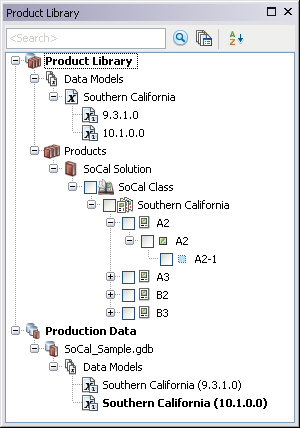
    Product Library tree view
  3. If necessary, expand Product Library and Products.
  4. Right-click the class or series and click one of the following:
    • Undo Check Out Class Template
    • Undo Check Out Series Template

    The Undo Checkout dialog box appears asking you if you want to undo the changes since the last checkout.

  5. Click Yes to undo the changes and the checkout.

    The undoing checkout dialog box appears with the progress.

  6. Click OK when the process completes.
  7. Tipp:

    The .mxd file does not close when you undo the checkout. To officially close the document, you need to open a new one.

ArcGIS Desktop

  • Startseite
  • Dokumentation
  • Support

ArcGIS Plattform

  • ArcGIS Online
  • ArcGIS Desktop
  • ArcGIS Enterprise
  • ArcGIS for Developers
  • ArcGIS Solutions
  • ArcGIS Marketplace

Über Esri

  • Über uns
  • Karriere
  • Insider-Blog
  • User Conference
  • Developer Summit
Esri
Wir sind an Ihrer Meinung interessiert.
Copyright © 2017 Esri. | Datenschutz | Rechtliches