Mit der Business Analyst-Lizenz verfügbar.
The Data Driven Rings tool creates rings that are similar to the Static Rings tool. However, this tool is unique because the size of the ring is determined by a numeric value in the store data, such as sales or store size (square feet). For example, a health care provider could use number of hospital beds to scale the size of each ring-based trade area. The greater the data value, the larger the ring. This analysis is primarily used to evaluate your competition, but it can also be used to analyze potential new locations.
A shopping mall with 1,000,000 square feet should be able to attract customers over a larger distance than one with 250,000 square feet. Data-driven rings can give you an approximate idea of the drawing radius of shopping centers. The estimated population can determine whether the center's service area meets a certain threshold population required for a business.
Other examples of data driven rings include the following:
- A developer of small shopping centers uses rings based on gross leasable area (GLA) to analyze the effects of competing centers.
- Store managers can use rings driven by total sales to justify higher real estate costs in larger power centers.
- You can create radius trade areas for competitors so you can examine whether a store is being cannibalized by the competition.
- This tool can also be used to find gaps in the market area.
Data-driven rings can be created around your stores when you specify a value in the store data. This value is set equal to a distance, and the rings are calculated in this way. To determine what value you want to use, select the field that determines the size of the trade area. If you already know the value you want to use, type it in the text box. If you aren't sure what value you want to use, click Field Statistics. The minimum, maximum, and mean values appear on the left side of the wizard.
If you select your stores' total sales field and specify $100,000, for example, to be proportional to a 1-mile ring, a store with $200,000 in sales will have a 2-mile ring, a store with $750,000 will have a 7.5-mile ring, and so on.
If your store layer contains a field that has actual radii for each store point, set the value per unit to one.
Ring method
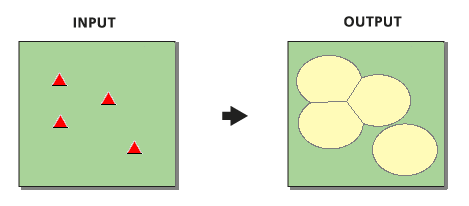
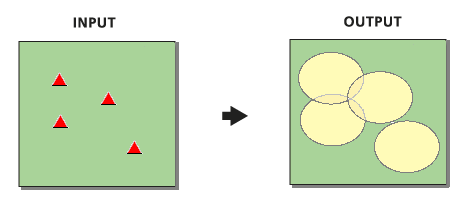
Rings can be created with any overlap removed. Overlap is removed using Thiessen polygons to find the midpoint between the intersecting areas.
- Uncheck the Remove Overlap check box to create concentric overlapping rings.
- Check the Remove Overlap check box to create nonoverlapping rings.