ArcGIS Desktop

  • ArcGIS Pro
  • ArcMap

  • My Profile
  • Hilfe
  • Sign Out
ArcGIS Desktop

ArcGIS Online

Die Mapping-Plattform für Ihre Organisation

ArcGIS Desktop

Ein vollständiges professionelles GIS

ArcGIS Enterprise

GIS in Ihrem Unternehmen

ArcGIS Developers

Werkzeuge zum Erstellen standortbezogener Apps

ArcGIS Solutions

Kostenlose Karten- und App-Vorlagen für Ihre Branche

ArcGIS Marketplace

Rufen Sie Apps und Daten für Ihre Organisation ab.

  • Dokumentation
  • Support
Esri
  • Anmelden
user
  • Eigenes Profil
  • Abmelden

ArcMap

  • Startseite
  • Erste Schritte
  • Karte
  • Analysieren
  • Verwalten von Daten
  • Werkzeuge
  • Erweiterungen

Creating airspace lines

The Create Airspace Lines tool generates line data from airspace features. You use this data to generate symbology and labels for both sides of the line features.

  1. Start ArcMap.
  2. Ensure that the correct product library and production database are set.
  3. On the main menu, click Customize > Toolbars > Aviation Data Management.
  4. Click the Create Airspace Lines button Create Airspace Lines on the Aviation Data Management toolbar.

    The Create Airspace Lines dialog box appears.

  5. In the Instance(s) to Process list, expand each node in the tree view until you find the instance against which the tool will run.
  6. Check the check box next to the instance name.
  7. Click the Preference drop-down arrow and choose a preference name.
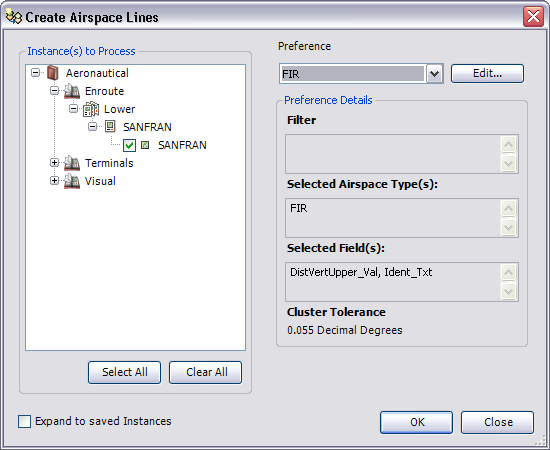
    The Create Airspace Lines dialog box

  8. To modify the airspace line preference, click Edit.
  9. Click OK to run the create airspace lines process.

    The Create Airspace Lines Results dialog box appears.

    Hinweis:

    Click View Log on the Create Airspace Lines Results dialog box to display additional information about the Create Airspace Lines process.

  10. Klicken Sie auf Schließen.

Verwandte Themen

  • Creating airspace lines preferences
  • Create airspace lines
  • Creating airspace area preferences

ArcGIS Desktop

  • Startseite
  • Dokumentation
  • Support

ArcGIS

  • ArcGIS Online
  • ArcGIS Desktop
  • ArcGIS Enterprise
  • ArcGIS
  • ArcGIS Developer
  • ArcGIS Solutions
  • ArcGIS Marketplace

Über Esri

  • Über uns
  • Karriere
  • Esri Blog
  • User Conference
  • Developer Summit
Esri
Wir sind an Ihrer Meinung interessiert.
Copyright © 2022 Esri. | Datenschutz | Rechtliches