ArcGIS Desktop

  • ArcGIS Pro
  • ArcMap

  • My Profile
  • Hilfe
  • Sign Out
ArcGIS Desktop

ArcGIS Online

Die Mapping-Plattform für Ihre Organisation

ArcGIS Desktop

Ein vollständiges professionelles GIS

ArcGIS Enterprise

GIS in Ihrem Unternehmen

ArcGIS Developers

Werkzeuge zum Erstellen standortbezogener Apps

ArcGIS Solutions

Kostenlose Karten- und App-Vorlagen für Ihre Branche

ArcGIS Marketplace

Rufen Sie Apps und Daten für Ihre Organisation ab.

  • Dokumentation
  • Support
Esri
  • Anmelden
user
  • Eigenes Profil
  • Abmelden

ArcMap

  • Startseite
  • Erste Schritte
  • Karte
  • Analysieren
  • Verwalten von Daten
  • Werkzeuge
  • Erweiterungen

Resetting the default values for the feature builder

Mit der Standard- oder Advanced-Lizenz verfügbar.

Mit der Production Mapping-Lizenz verfügbar.

The feature builder has several properties that can be customized on the Feature Builder Settings dialog box, including the precision of coordinates, the function library to use, and the spatial reference extent. The Other category contains an option that allows you to reset all the currently configured settings and values to the installed default values, including the order of the functions.

  1. Start ArcMap.
  2. On the menu bar, click Customize > Toolbars > Production Feature Builder.
  3. Click the Feature Builder button Feature Builder on the Production Feature Builder toolbar.

    The Feature Builder window appears.

    Tipp:

    The Feature Builder window can be placed anywhere in ArcMap, or in the Table Of Contents window, with the aid of the arrows showing the possible placement positions.

  4. Click the Settings button Settings at the top of the Feature Builder window.

    The Feature Builder Settings dialog box appears.
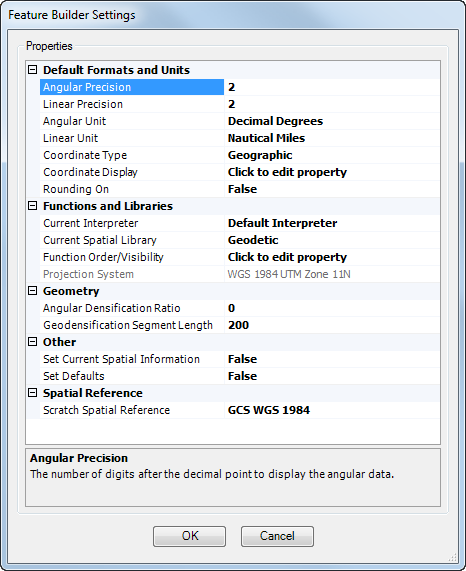
    Feature Builder Settings General pane
  5. Click the cell next to Set Defaults.
  6. Click the drop-down arrow in the cell and choose True.
  7. Klicken Sie auf OK.

Settings revert to the values that are defaults when the software is initially installed.

ArcGIS Desktop

  • Startseite
  • Dokumentation
  • Support

ArcGIS

  • ArcGIS Online
  • ArcGIS Desktop
  • ArcGIS Enterprise
  • ArcGIS
  • ArcGIS Developer
  • ArcGIS Solutions
  • ArcGIS Marketplace

Über Esri

  • Über uns
  • Karriere
  • Esri Blog
  • User Conference
  • Developer Summit
Esri
Wir sind an Ihrer Meinung interessiert.
Copyright © 2022 Esri. | Datenschutz | Rechtliches