ArcGIS Desktop

  • ArcGIS Pro
  • ArcMap

  • My Profile
  • Hilfe
  • Sign Out
ArcGIS Desktop

ArcGIS Online

Die Mapping-Plattform für Ihre Organisation

ArcGIS Desktop

Ein vollständiges professionelles GIS

ArcGIS Enterprise

GIS in Ihrem Unternehmen

ArcGIS Developers

Werkzeuge zum Erstellen standortbezogener Apps

ArcGIS Solutions

Kostenlose Karten- und App-Vorlagen für Ihre Branche

ArcGIS Marketplace

Rufen Sie Apps und Daten für Ihre Organisation ab.

  • Dokumentation
  • Support
Esri
  • Anmelden
user
  • Eigenes Profil
  • Abmelden

ArcMap

  • Startseite
  • Erste Schritte
  • Karte
  • Analysieren
  • Verwalten von Daten
  • Werkzeuge
  • Erweiterungen

Viewing cartographic exception statistics

The Cartographic Exceptions Statistics tool displays a summary of the cartographic exceptions stored in the selected aviation production database. The summary is categorized by instance, feature class, and exception type.

  1. Start ArcMap.
  2. Ensure that the correct product library and production database are set.
  3. Ensure that your chart's data frame is set to the appropriate instance by right-clicking the data frame, clicking Properties, and clicking the Product Library tab.
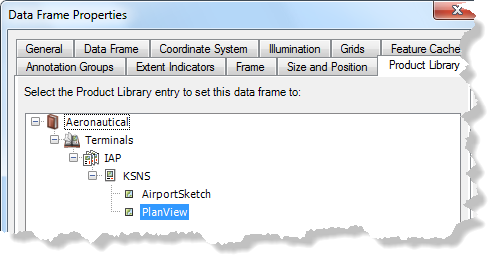
    Data Frame Properties dialog box

  4. On the main menu, click Customize > Toolbars > Aviation Data Management.
  5. Click the Cartographic Exceptions Statistics button Cartographic Exceptions Statistics on the Aviation Data Management toolbar.

    The Cartographic Exception Statistics dialog box appears.
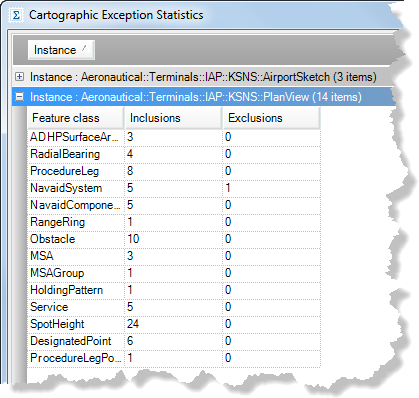
    Cartographic Exception Statistics dialog box

  6. Click an option to display statistics:
    • Show All—Displays all statistics for each data frame on the chart.
    • Show Errors—Only displays errors for each data frame on the chart. This can occur if the main feature has been moved or deleted.
  7. To view the statistics report as a text file that can be saved, click View Log.
  8. Click Close to close the window.

ArcGIS Desktop

  • Startseite
  • Dokumentation
  • Support

ArcGIS

  • ArcGIS Online
  • ArcGIS Desktop
  • ArcGIS Enterprise
  • ArcGIS
  • ArcGIS Developer
  • ArcGIS Solutions
  • ArcGIS Marketplace

Über Esri

  • Über uns
  • Karriere
  • Esri Blog
  • User Conference
  • Developer Summit
Esri
Wir sind an Ihrer Meinung interessiert.
Copyright © 2022 Esri. | Datenschutz | Rechtliches