ArcGIS Desktop

  • ArcGIS Pro
  • ArcMap

  • My Profile
  • Hilfe
  • Sign Out
ArcGIS Desktop

ArcGIS Online

Die Mapping-Plattform für Ihre Organisation

ArcGIS Desktop

Ein vollständiges professionelles GIS

ArcGIS Enterprise

GIS in Ihrem Unternehmen

ArcGIS Developers

Werkzeuge zum Erstellen standortbezogener Apps

ArcGIS Solutions

Kostenlose Karten- und App-Vorlagen für Ihre Branche

ArcGIS Marketplace

Rufen Sie Apps und Daten für Ihre Organisation ab.

  • Dokumentation
  • Support
Esri
  • Anmelden
user
  • Eigenes Profil
  • Abmelden

ArcMap

  • Startseite
  • Erste Schritte
  • Karte
  • Analysieren
  • Verwalten von Daten
  • Werkzeuge
  • Erweiterungen

Setting layer transparency in the Split View window

The Layer Transparency tool sets the transparency of polygon layers in the Split View window. Transparency can be used for any symbolization type, but it is especially useful for drawing raster layers with other layers on your map. Adding transparency to the polygon layers allows you to see them while still viewing underlying layers.

  1. Start ArcMap.
  2. On the main menu, click Customize > Toolbars > Defense Mapping.
  3. Click the Split View button Split View on the Defense Mapping toolbar.

    The Split View window appears and contains all the layers in the Table Of Contents window.
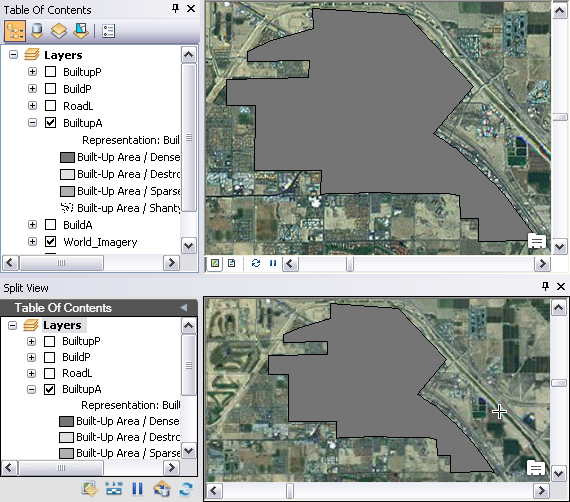
    ArcMap and Split View windows
    Tipp:

    You can dock the window anywhere inside of ArcMap or move it to another monitor based on your setup needs.

  4. Click the Layer Transparency button Layer Transparency on the Split View window.

    The Feature Layer Transparency dialog box appears.

  5. Drag the slider bar to adjust the transparency.

    Once you let go of the slider, the Feature Layer Transparency dialog box closes and the polygon layers you have loaded become transparent.

    Polygon 25% transparent

ArcGIS Desktop

  • Startseite
  • Dokumentation
  • Support

ArcGIS

  • ArcGIS Online
  • ArcGIS Desktop
  • ArcGIS Enterprise
  • ArcGIS
  • ArcGIS Developer
  • ArcGIS Solutions
  • ArcGIS Marketplace

Über Esri

  • Über uns
  • Karriere
  • Esri Blog
  • User Conference
  • Developer Summit
Esri
Wir sind an Ihrer Meinung interessiert.
Copyright © 2021 Esri. | Datenschutz | Rechtliches