ArcGIS Desktop

  • ArcGIS Pro
  • ArcMap

  • My Profile
  • Hilfe
  • Sign Out
ArcGIS Desktop

ArcGIS Online

Die Mapping-Plattform für Ihre Organisation

ArcGIS Desktop

Ein vollständiges professionelles GIS

ArcGIS Enterprise

GIS in Ihrem Unternehmen

ArcGIS Developers

Werkzeuge zum Erstellen standortbezogener Apps

ArcGIS Solutions

Kostenlose Karten- und App-Vorlagen für Ihre Branche

ArcGIS Marketplace

Rufen Sie Apps und Daten für Ihre Organisation ab.

  • Dokumentation
  • Support
Esri
  • Anmelden
user
  • Eigenes Profil
  • Abmelden

ArcMap

  • Startseite
  • Erste Schritte
  • Karte
  • Analysieren
  • Verwalten von Daten
  • Werkzeuge
  • Erweiterungen

Applying a definition query set to your data

Mit der Production Mapping-Lizenz verfügbar.

Once you have created definition query sets, you can apply them to data in different charts.

  1. Start ArcMap.
  2. Add the Feature Display Settings tool in ArcMap by doing the following:
    1. On the main menu, click Customize > Toolbars > Customize.

      The Customize dialog box appears.

    2. Click the Commands tab. In the Categories list, choose Production Cartography.
    3. In the Commands list, choose Feature Display Settings.
    4. Drag the Feature Display Settings tool Feature Display Settings onto any toolbar.
  3. Click the Feature Display Settings button Feature Display Settings.

    The Feature Display Settings dialog box appears.
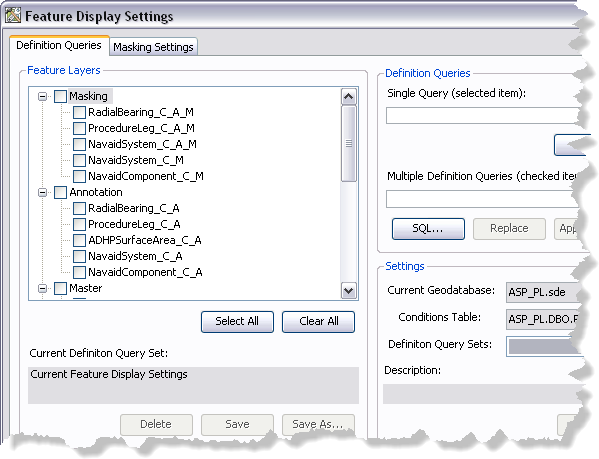
    Feature Display Settings dialog box
  4. If necessary, click the Definition Queries tab.
  5. Click the Definition Query Sets drop-down arrow and choose the definition query set you want to apply to the layers in your map.
  6. Click Load.

    Hinweis:

    Once the query set has loaded, layers in the Feature Layers list change color from black to blue if their feature layer definition query will be updated.

  7. Click Apply.

    A message appears indicating that query definition conditions have been applied to feature layers in the map.

    Applying query definition message
  8. Klicken Sie auf OK.
  9. Click the Close button Close to close the Feature Display Settings dialog box.

    Tipp:

    When you apply a definition query, the definition query becomes part of the feature layer's properties. You must save the MXD to retain the changes made to the definition queries.

Verwandte Themen

  • Updating definition query sets

ArcGIS Desktop

  • Startseite
  • Dokumentation
  • Support

ArcGIS

  • ArcGIS Online
  • ArcGIS Desktop
  • ArcGIS Enterprise
  • ArcGIS
  • ArcGIS Developer
  • ArcGIS Solutions
  • ArcGIS Marketplace

Über Esri

  • Über uns
  • Karriere
  • Esri Blog
  • User Conference
  • Developer Summit
Esri
Wir sind an Ihrer Meinung interessiert.
Copyright © 2021 Esri. | Datenschutz | Rechtliches