ArcGIS Desktop

  • ArcGIS Pro
  • ArcMap

  • My Profile
  • Hilfe
  • Sign Out
ArcGIS Desktop

ArcGIS Online

Die Mapping-Plattform für Ihre Organisation

ArcGIS Desktop

Ein vollständiges professionelles GIS

ArcGIS Enterprise

GIS in Ihrem Unternehmen

ArcGIS Developers

Werkzeuge zum Erstellen standortbezogener Apps

ArcGIS Solutions

Kostenlose Karten- und App-Vorlagen für Ihre Branche

ArcGIS Marketplace

Rufen Sie Apps und Daten für Ihre Organisation ab.

  • Dokumentation
  • Support
Esri
  • Anmelden
user
  • Eigenes Profil
  • Abmelden

ArcMap

  • Startseite
  • Erste Schritte
  • Karte
  • Analysieren
  • Verwalten von Daten
  • Werkzeuge
  • Erweiterungen

Customizing contour field names

Mit der Production Mapping-Lizenz verfügbar.

Many of the contour tools require specific contour attributes. For instance, the Symbolize Contours tool requires the field that has the height values to symbolize the contours. The standard field for the height value is ZV2, but it may be a different field in your geodatabase. The Contour Field Name Options dialog box provides you with the ability to designate the names of the fields used by the contouring tools.

  1. Start ArcMap.
  2. On the main menu, click Customize > Toolbars > Production Contouring.
  3. Click the Contour Field Name Options button Contour Field Name Options.

    The Contour Field Names Customizer dialog box appears.
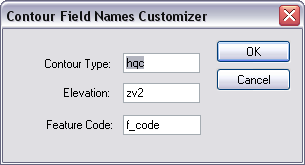
    Contour Field Names Customizer dialog box
  4. Type the name of the field that contains the contour type in the Contour Type text box.

    For example, the database may define your contour type using Alt.

    Hinweis:

    You cannot use spaces or special characters in the field names.

  5. Type the name of the field that contains the elevation values in the Elevation text box.

    Hinweis:

    You cannot use spaces or special characters in the field names.

  6. Type the name of the field that contains the feature code in the Feature Code text box.

    Hinweis:

    You cannot use spaces or special characters in the field names.

  7. Click OK.

Verwandte Themen

  • Creating contours on DEM layers

ArcGIS Desktop

  • Startseite
  • Dokumentation
  • Support

ArcGIS

  • ArcGIS Online
  • ArcGIS Desktop
  • ArcGIS Enterprise
  • ArcGIS
  • ArcGIS Developer
  • ArcGIS Solutions
  • ArcGIS Marketplace

Über Esri

  • Über uns
  • Karriere
  • Esri Blog
  • User Conference
  • Developer Summit
Esri
Wir sind an Ihrer Meinung interessiert.
Copyright © 2021 Esri. | Datenschutz | Rechtliches