ArcGIS Desktop

  • ArcGIS Pro
  • ArcMap

  • My Profile
  • Hilfe
  • Sign Out
ArcGIS Desktop

ArcGIS Online

Die Mapping-Plattform für Ihre Organisation

ArcGIS Desktop

Ein vollständiges professionelles GIS

ArcGIS Enterprise

GIS in Ihrem Unternehmen

ArcGIS Developers

Werkzeuge zum Erstellen standortbezogener Apps

ArcGIS Solutions

Kostenlose Karten- und App-Vorlagen für Ihre Branche

ArcGIS Marketplace

Rufen Sie Apps und Daten für Ihre Organisation ab.

  • Dokumentation
  • Support
Esri
  • Anmelden
user
  • Eigenes Profil
  • Abmelden

ArcMap

  • Startseite
  • Erste Schritte
  • Karte
  • Analysieren
  • Verwalten von Daten
  • Werkzeuge
  • Erweiterungen

Exporting to coverages when you are not an administrator

Mit der Production Mapping-Lizenz verfügbar.

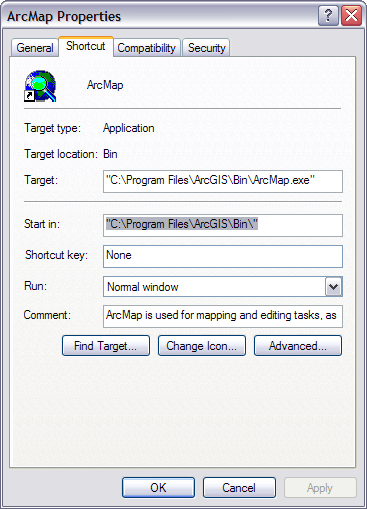
If you attempt to export feature classes to coverages when you are not an administrator, you may receive an error message. When this happens, you need to change the directory in which ArcMap starts on the ArcMap Properties dialog box. The path in the Start in text box needs to be a directory for which you have read and write privileges. For example, this could be $\Documents and Settings\[login]\.

Once the Start in path is changed, you can export the geodatabase to coverages.

  1. Right-click the ArcMap item on the Start menu or the shortcut on your desktop and click Properties.

    The ArcMap Properties dialog box appears.

  2. If necessary, click the Shortcut tab.
    Shortcut tab on the ArcMap Properties dialog box
  3. Change the path in the Start in text box to a directory to which you can read and write.

    An example of a directory is C:\Documents and Settings\[user name].

  4. Click OK.

Verwandte Themen

  • Creating an ArcGIS for Desktop Advanced coverage using a mapping table
  • Creating an ArcGIS for Desktop Advanced coverage using selected layers

ArcGIS Desktop

  • Startseite
  • Dokumentation
  • Support

ArcGIS

  • ArcGIS Online
  • ArcGIS Desktop
  • ArcGIS Enterprise
  • ArcGIS
  • ArcGIS Developer
  • ArcGIS Solutions
  • ArcGIS Marketplace

Über Esri

  • Über uns
  • Karriere
  • Esri Blog
  • User Conference
  • Developer Summit
Esri
Wir sind an Ihrer Meinung interessiert.
Copyright © 2021 Esri. | Datenschutz | Rechtliches