ArcGIS Desktop

  • ArcGIS Pro
  • ArcMap

  • My Profile
  • Hilfe
  • Sign Out
ArcGIS Desktop

ArcGIS Online

Die Mapping-Plattform für Ihre Organisation

ArcGIS Desktop

Ein vollständiges professionelles GIS

ArcGIS Enterprise

GIS in Ihrem Unternehmen

ArcGIS Developers

Werkzeuge zum Erstellen standortbezogener Apps

ArcGIS Solutions

Kostenlose Karten- und App-Vorlagen für Ihre Branche

ArcGIS Marketplace

Rufen Sie Apps und Daten für Ihre Organisation ab.

  • Dokumentation
  • Support
Esri
  • Anmelden
user
  • Eigenes Profil
  • Abmelden

ArcMap

  • Startseite
  • Erste Schritte
  • Karte
  • Analysieren
  • Verwalten von Daten
  • Werkzeuge
  • Erweiterungen

Viewing query results

Mit der Standard- oder Advanced-Lizenz verfügbar.

  • Viewing query results in the list view
  • Viewing query results in the map view

Two views are available to display the selected job query: list and map. The list view displays the jobs for the selected job query in a table format with columns specified by the job query. The map view will display each LOI for jobs in the selected query with a defined LOI. If an LOI has not been specified for the job, the job will not appear on the map.

Hinweis:

ArcGIS Pro maps (.mapx) stored in the Workflow Manager (Classic) repository and ArcGIS Pro map(.mapx), layouts (.pagx), or web maps stored in ArcGIS Online or Portal for ArcGIS cannot be viewed in the Job Result map view in ArcGIS Workflow Manager (Classic).

Viewing query results in the list view

The list view gives you a tabular view on the jobs in the Workflow Manager (Classic) repository.

  1. Select a query from the Jobs tab.
  2. Click the List tab to activate the view.
    List View

Viewing query results in the map view

The map view gives you a spatial view of the jobs in the Workflow Manager (Classic) repository.

  1. Select a query from the Jobs tab.
  2. Click the Map tab to activate the view.

    Several tools are present on the Map View window: Zoom In, Zoom Out, Full Extent, Pan, Select Features, and Refresh View. The Select Features tool allows you to select an LOI in the map view. When a new LOI is selected, the information in the main tabs updates to reflect information about a job.
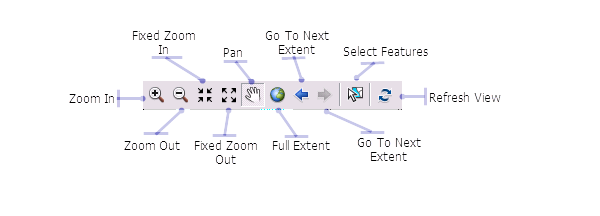
    Map view tools
    Map View window

ArcGIS Desktop

  • Startseite
  • Dokumentation
  • Support

ArcGIS

  • ArcGIS Online
  • ArcGIS Desktop
  • ArcGIS Enterprise
  • ArcGIS
  • ArcGIS Developer
  • ArcGIS Solutions
  • ArcGIS Marketplace

Über Esri

  • Über uns
  • Karriere
  • Esri Blog
  • User Conference
  • Developer Summit
Esri
Wir sind an Ihrer Meinung interessiert.
Copyright © 2021 Esri. | Datenschutz | Rechtliches