ArcGIS Desktop

  • ArcGIS Pro
  • ArcMap

  • My Profile
  • Hilfe
  • Sign Out
ArcGIS Desktop

ArcGIS Online

Die Mapping-Plattform für Ihre Organisation

ArcGIS Desktop

Ein vollständiges professionelles GIS

ArcGIS Enterprise

GIS in Ihrem Unternehmen

ArcGIS Developers

Werkzeuge zum Erstellen standortbezogener Apps

ArcGIS Solutions

Kostenlose Karten- und App-Vorlagen für Ihre Branche

ArcGIS Marketplace

Rufen Sie Apps und Daten für Ihre Organisation ab.

  • Dokumentation
  • Support
Esri
  • Anmelden
user
  • Eigenes Profil
  • Abmelden

ArcMap

  • Startseite
  • Erste Schritte
  • Karte
  • Analysieren
  • Verwalten von Daten
  • Werkzeuge
  • Erweiterungen

Sorting items within a column

Mit der Production Mapping-Lizenz verfügbar.

You have the ability to sort the items within a column in ascending or descending order by clicking the header of each column.

  1. Start ArcMap.
  2. Click the Visual Specifications button Visual Specifications on the Production Symbology toolbar.

    The Visual Specifications dialog box appears.
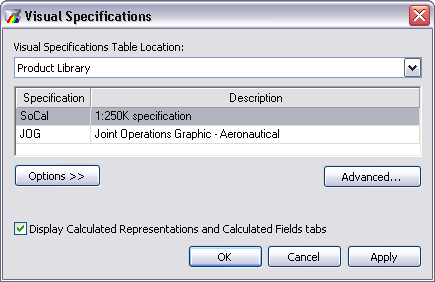
    Visual Specifications dialog box

  3. Click Advanced.

    The Visual Specifications Advanced View dialog box appears, displaying rules saved in the selected specifications.

    The Visual Specifications Advanced View dialog box

  4. Click the header on each column to sort the column contents in ascending or descending order.

ArcGIS Desktop

  • Startseite
  • Dokumentation
  • Support

ArcGIS

  • ArcGIS Online
  • ArcGIS Desktop
  • ArcGIS Enterprise
  • ArcGIS
  • ArcGIS Developer
  • ArcGIS Solutions
  • ArcGIS Marketplace

Über Esri

  • Über uns
  • Karriere
  • Esri Blog
  • User Conference
  • Developer Summit
Esri
Wir sind an Ihrer Meinung interessiert.
Copyright © 2021 Esri. | Datenschutz | Rechtliches