ArcGIS Desktop

  • ArcGIS Pro
  • ArcMap

  • My Profile
  • Hilfe
  • Sign Out
ArcGIS Desktop

ArcGIS Online

Die Mapping-Plattform für Ihre Organisation

ArcGIS Desktop

Ein vollständiges professionelles GIS

ArcGIS Enterprise

GIS in Ihrem Unternehmen

ArcGIS Developers

Werkzeuge zum Erstellen standortbezogener Apps

ArcGIS Solutions

Kostenlose Karten- und App-Vorlagen für Ihre Branche

ArcGIS Marketplace

Rufen Sie Apps und Daten für Ihre Organisation ab.

  • Dokumentation
  • Support
Esri
  • Anmelden
user
  • Eigenes Profil
  • Abmelden

ArcMap

  • Startseite
  • Erste Schritte
  • Karte
  • Analysieren
  • Verwalten von Daten
  • Werkzeuge
  • Erweiterungen

How Create Profile From Segmentation Coded Table (Business Analyst) works

Mit der Business Analyst-Lizenz verfügbar.

Use the Create Profile From Segmentation Coded Table tool when you want to create a segmentation profile from a table that already has a segmentation code. For example, you may have a table of customer addresses that already has a Tapestry segmentation field. Use this tool to import these customer records and summarize the Tapestry information in a new segmentation profile. Volume information will be aggregated for each Tapestry segment in the input table.

The table below illustrates how a segmentation coded table may look. With the Create Profile From Segmentation Coded Table tool, the Segmentation ID field will be set to the TAPESTRY field. The corresponding segmentation profile that will be created will summarize the number of customers in each segment.
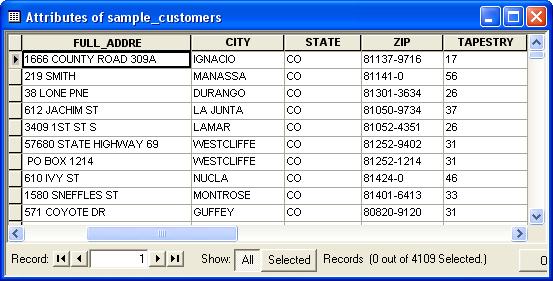
Tapestry Coded Table

ArcGIS Desktop

  • Startseite
  • Dokumentation
  • Support

ArcGIS

  • ArcGIS Online
  • ArcGIS Desktop
  • ArcGIS Enterprise
  • ArcGIS
  • ArcGIS Developer
  • ArcGIS Solutions
  • ArcGIS Marketplace

Über Esri

  • Über uns
  • Karriere
  • Esri Blog
  • User Conference
  • Developer Summit
Esri
Wir sind an Ihrer Meinung interessiert.
Copyright © 2022 Esri. | Datenschutz | Rechtliches