Mit der Business Analyst-Lizenz verfügbar.
Zusammenfassung
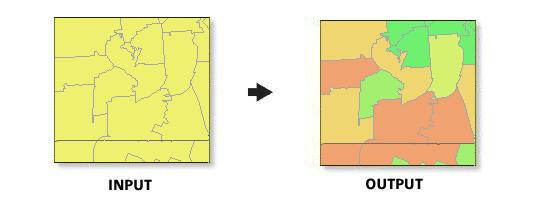
Thematically shades the percent penetration of selected segments. This map helps you determine the concentration of your target segments at a given level of geography.
Abbildung
Verwendung
To best determine what segments to include in the Penetration Map, you should analyze the output from the Profile Segmentation Report.
The Segmentation Layer parameter should be set higher than the block group geography, for example, Census Tracts or ZIP Codes. There must be a distribution of households for a unit of geography for this map to be created.
The Segmentation Base can be generated using total adult population or total households.
Total adult population includes individuals 18 years old or older.
You may want to create a Game Plan Chart to help you in the selection of your segments.
You can change the default colors used in the Penetration Map by editing the Business Analyst Styles document. You can edit these colors in ArcMap by using Customize > Style Manager
Syntax
arcpy.ba.SegmentationPenetrationMap(SegmentationBase, SegmentaionClusters, SegmentationLayer, SegmentationAnalysisResultFolder, {CreateReport}, {CreateFeatureClass})| Parameter | Erklärung | Datentyp |
SegmentationBase | The segmentation base can be generated using total adult population or total households. | String |
SegmentaionClusters [SegmentaionClusters,...] | One or more segments used to define your summarized target penetration. | String |
SegmentationLayer | The geographic layer containing the segmentation variables. Typically, the segmentation variables are Tapestry variables. | String |
SegmentationAnalysisResultFolder | The output file directory. | Folder |
CreateReport (optional) | Generates a Segmentation Penetration Map report.
| Boolean |
CreateFeatureClass (optional) | Generates an output feature class for the Segmentation Penetration Map.
| Boolean |
Codebeispiel
SegmentationPenetrationMap example (stand-alone script)
# Name: SegmentationPenetrationMap.py
# Description: Creats a Segmentation penetration map based on selected Tapestry variables.
# Author: Esri

# Import system modules
import arcview
import arcpy

arcpy.ImportToolbox(r"C:\Program Files (x86)\ArcGIS\Desktop10.8\Business Analyst\ArcToolbox\Toolboxes\Business Analyst Tools.tbx")

try:
# Acquire extension license
  arcpy.CheckOutExtension("Business")

# Define input and output parameters for the Segmentation Penetration Map tool
  GeoLayer = "C:/ArcGIS/Business Analyst/US_2022/Data/Demographic Data/BlockGroups_bg.bds"
  OutPath = "C:/temp/Output_Segmentation"

# Create Customer Segmentation Penetration Map
  arcpy.SegmentationPenetrationMap_ba("Total Adult Population", "Boomburbs; Exurbanites", "US.BDS.BlockGroups", GeoLayer, OutPath, CREATE_REPORT)

# Release extension license
arcpy.CheckInExtension("Business")
Umgebungen
Dieses Werkzeug verwendet keine Geoverarbeitungsumgebungen.
Lizenzinformationen
- Basic: Erfordert Business Analyst
- Standard: Erfordert Business Analyst
- Advanced: Erfordert Business Analyst