ArcGIS for Desktop

  • Documentation
  • Pricing
  • Support

  • My Profile
  • Help
  • Sign Out
ArcGIS for Desktop

ArcGIS Online

The mapping platform for your organization

ArcGIS for Desktop

A complete professional GIS

ArcGIS for Server

GIS in your enterprise

ArcGIS for Developers

Tools to build location-aware apps

ArcGIS Solutions

Free template maps and apps for your industry

ArcGIS Marketplace

Get apps and data for your organization

  • Documentation
  • Pricing
  • Support
Esri
  • Sign In
user
  • My Profile
  • Sign Out

Help

  • Home
  • Get Started
  • Map
  • Analyze
  • Manage Data
  • Tools
  • More...

Upload a project

    To make an existing Business Analyst Desktop project available to Business Analyst Server, upload it to the server using the ArcCatalog application.

    To perform this task, follow these steps:

    1. Start a session in ArcCatalog.
    2. Navigate to Catalog > Business Analyst Repository.
    3. Right-click the project you want to upload.
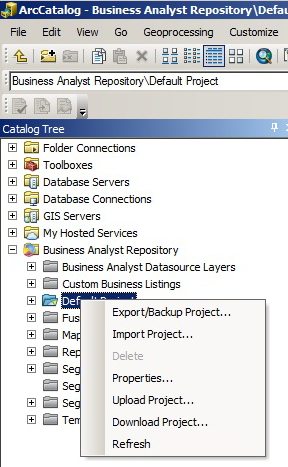
      Business Analyst Server upload project
    4. Click Upload Project and check the items you want to upload.
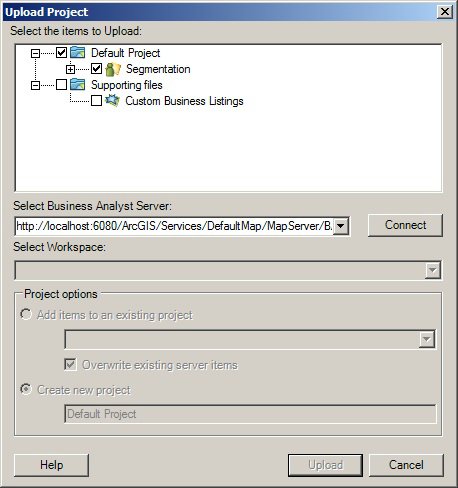
      Business Analyst Server select project to upload
    5. In the Select Business Analyst Server drop-down list, enter the link to the Business Analyst Map Service that you want to upload the project to and click Connect.

      Note:

      For help, place the mouse pointer directly over the URL field and a dialog box appears with information.

    6. In the Authentication dialog box, enter the credentials of a user that is a member of the publisher role for Server for ArcGIS.
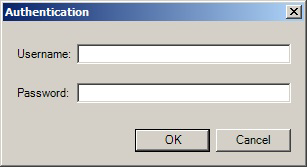
      Upload authentication

      See Managing roles in Manager for more information.

    7. Select the items you want to upload and the project you want to upload to.

      Supporting files are not project specific. You aren't required to pick a project to upload to.

    8. Click Upload.
    Feedback on this topic?

    ArcGIS for Desktop

    • Home
    • Documentation
    • Pricing
    • Support

    ArcGIS Platform

    • ArcGIS Online
    • ArcGIS for Desktop
    • ArcGIS for Server
    • ArcGIS for Developers
    • ArcGIS Solutions
    • ArcGIS Marketplace

    About Esri

    • About Us
    • Careers
    • Insiders Blog
    • User Conference
    • Developer Summit
    Esri
    © Copyright 2016 Environmental Systems Research Institute, Inc. | Privacy | Legal