ArcGIS for Desktop

  • Documentation
  • Pricing
  • Support

  • My Profile
  • Help
  • Sign Out
ArcGIS for Desktop

ArcGIS Online

The mapping platform for your organization

ArcGIS for Desktop

A complete professional GIS

ArcGIS for Server

GIS in your enterprise

ArcGIS for Developers

Tools to build location-aware apps

ArcGIS Solutions

Free template maps and apps for your industry

ArcGIS Marketplace

Get apps and data for your organization

  • Documentation
  • Pricing
  • Support
Esri
  • Sign In
user
  • My Profile
  • Sign Out

Help

  • Home
  • Get Started
  • Map
  • Analyze
  • Manage Data
  • Tools
  • More...

Maps tool

The online base maps include Imagery, World Street Map and World Topographic Map. These are included by default. You can add or remove these layers from the map.

Use my favorite layer to add any layer to the Maps menu and turning off and on. You can add .lyr files to C:\My Output Data\ArcGIS Online Maps. Newly saved map services or layers must be saved to C:\My Output Data\ArcGIS Online Maps as well. The default Maps layers are installed to C:\arcgis\Business Analyst\US\Datasets\ArcGIS Online Maps.

Use Add Data from ArcGIS Online to search for other data services and layers and include them in the Maps menu for convenience. Be sure you are connected to the Internet to use the Maps menu.

A similar way to add services is through the Add Data command in ArcGIS.
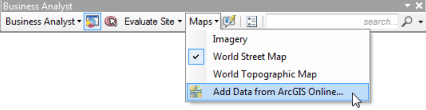
Maps Menu
Feedback on this topic?

ArcGIS for Desktop

  • Home
  • Documentation
  • Pricing
  • Support

ArcGIS Platform

  • ArcGIS Online
  • ArcGIS for Desktop
  • ArcGIS for Server
  • ArcGIS for Developers
  • ArcGIS Solutions
  • ArcGIS Marketplace

About Esri

  • About Us
  • Careers
  • Insiders Blog
  • User Conference
  • Developer Summit
Esri
© Copyright 2016 Environmental Systems Research Institute, Inc. | Privacy | Legal