Your work in Business Analyst is automatically saved in the Business Analyst Repository My Output Data folder. This is usually located at C:\My Output Data\ but can be changed to any location, such as a network folder, from Business Analyst Preferences. The My Output Data directory is an easy way to access, store, and back up the following:
- Projects
- Report Templates
- Custom BDS Layers
- ArcGIS Online Maps
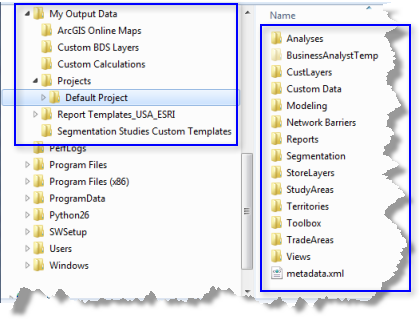
The following default folders are part of each Business Analyst project that is created. The contents become populated with your work, with the files saved in formats such as file geodatabase or shapefile.
- Analyses: Contains information about the analyses you have done.
- BusinessAnalystTemp: Contains all the temporary files needed for certain processes. These files are often deleted automatically after a job is complete.
- CustLayers: Contains all the geocoded customer files.
- Custom Data: Contains business search files. You can also save ancillary files such as Word documents, custom parcel boundaries, and aerial images. Each of these documents can be backed up with your project folders.
- Modeling: Contains any model calibration data and model calculation results.
- Reports: Contains any demographic/summary reports you've run.
- Segmentation: Contains all segmentation profiles, analyses, studies, and target groups you've created.
- StoreLayers: Contains all geocoded store files.
- StudyAreas: Contains your study areas.
- Territories: Contains layer files and file geodatabases of each territory solution created in Territory Design.
- Toolbox: Contains files for any models created using geoprocessing tools. Your batch tasks are saved as TBX files here.
- TradeAreas: Contains all trade areas.
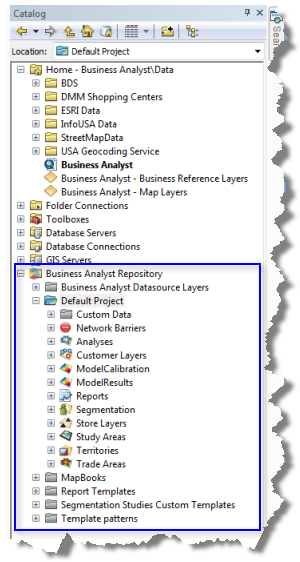
The images below provide a behind the scenes look.
The Business Analyst Repository in Windows Explorer is in the blue box.
The Business Analyst Repository in Catalog view is in the blue box in the image below.