ArcGIS for Desktop

  • Documentation
  • Pricing
  • Support

  • My Profile
  • Help
  • Sign Out
ArcGIS for Desktop

ArcGIS Online

The mapping platform for your organization

ArcGIS for Desktop

A complete professional GIS

ArcGIS for Server

GIS in your enterprise

ArcGIS for Developers

Tools to build location-aware apps

ArcGIS Solutions

Free template maps and apps for your industry

ArcGIS Marketplace

Get apps and data for your organization

  • Documentation
  • Pricing
  • Support
Esri
  • Sign In
user
  • My Profile
  • Sign Out

Help

  • Home
  • Get Started
  • Map
  • Analyze
  • Manage Data
  • Tools
  • More...

Online tab

Use the Online tab to view your current status and access online reports, data and data collections for appending. You can also set a proxy server for certain online settings.

Note:

You can sign in with your credentials from Business Analyst Desktop by selecting File > Sign In...

In the Online Access section you can use the online data in features like Data Append and the Color Coded-Maps toolbar. Online reports are available through the Demographic/Summary reports. All data is stored remotely and executed through the ArcGIS Online API.

The Hierarchy section allows you to isolate and work with different demographic dataset hierarchies, such as Census or Landscape. You can select the different hierarchies from the drop-down menu. Once these are selected, the associated data will be available in features throughout the software, such as color-coded maps, reports, and data appends.
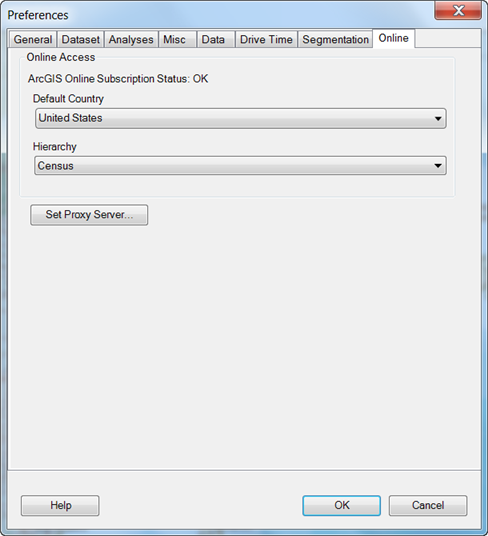
Online tab
Feedback on this topic?

ArcGIS for Desktop

  • Home
  • Documentation
  • Pricing
  • Support

ArcGIS Platform

  • ArcGIS Online
  • ArcGIS for Desktop
  • ArcGIS for Server
  • ArcGIS for Developers
  • ArcGIS Solutions
  • ArcGIS Marketplace

About Esri

  • About Us
  • Careers
  • Insiders Blog
  • User Conference
  • Developer Summit
Esri
© Copyright 2016 Environmental Systems Research Institute, Inc. | Privacy | Legal