ArcGIS for Desktop

  • Documentation
  • Pricing
  • Support

  • My Profile
  • Help
  • Sign Out
ArcGIS for Desktop

ArcGIS Online

The mapping platform for your organization

ArcGIS for Desktop

A complete professional GIS

ArcGIS for Server

GIS in your enterprise

ArcGIS for Developers

Tools to build location-aware apps

ArcGIS Solutions

Free template maps and apps for your industry

ArcGIS Marketplace

Get apps and data for your organization

  • Documentation
  • Pricing
  • Support
Esri
  • Sign In
user
  • My Profile
  • Sign Out

Help

  • Home
  • Get Started
  • Map
  • Analyze
  • Manage Data
  • Tools
  • More...

Map Display tab

    Allows you to control the territory levels shown with internal boundaries in ArcMap. An example would be if you have two territories created from a set of 30 ZIP Codes, the ZIP Code boundaries are displayed within each territory.
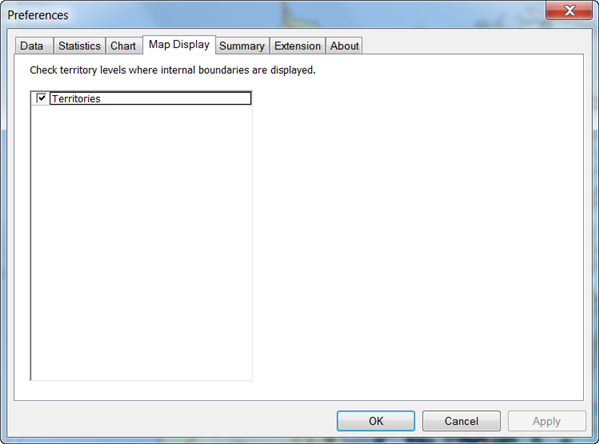
    When a territory is created, the alignment layer boundary files are dissolved to form a contiguous territory polygon. Displaying the boundaries can be helpful if you want to show the total boundaries within each territory or the size distribution of the boundaries.

    Feedback on this topic?

    ArcGIS for Desktop

    • Home
    • Documentation
    • Pricing
    • Support

    ArcGIS Platform

    • ArcGIS Online
    • ArcGIS for Desktop
    • ArcGIS for Server
    • ArcGIS for Developers
    • ArcGIS Solutions
    • ArcGIS Marketplace

    About Esri

    • About Us
    • Careers
    • Insiders Blog
    • User Conference
    • Developer Summit
    Esri
    © Copyright 2016 Environmental Systems Research Institute, Inc. | Privacy | Legal