ArcGIS for Desktop

  • Documentation
  • Pricing
  • Support

  • My Profile
  • Help
  • Sign Out
ArcGIS for Desktop

ArcGIS Online

The mapping platform for your organization

ArcGIS for Desktop

A complete professional GIS

ArcGIS for Server

GIS in your enterprise

ArcGIS for Developers

Tools to build location-aware apps

ArcGIS Solutions

Free template maps and apps for your industry

ArcGIS Marketplace

Get apps and data for your organization

  • Documentation
  • Pricing
  • Support
Esri
  • Sign In
user
  • My Profile
  • Sign Out

Help

  • Home
  • Get Started
  • Map
  • Analyze
  • Manage Data
  • Tools
  • More...

Print maps

  • Data view versus layout view
  • Example of a map series

The Map Layout report allows you to easily export the area of the map that you are zoomed to into a predefined report template. Another option is to export the map directly from ArcGIS using File > Export Map, but the formatting of the Map Layout report is consistent with the other reports available in Business Analyst. You can choose between creating a map of the current extent or creating a series of maps.

Data view versus layout view

  • If the ArcMap data view is open, a report is returned with only what is shown in the view.
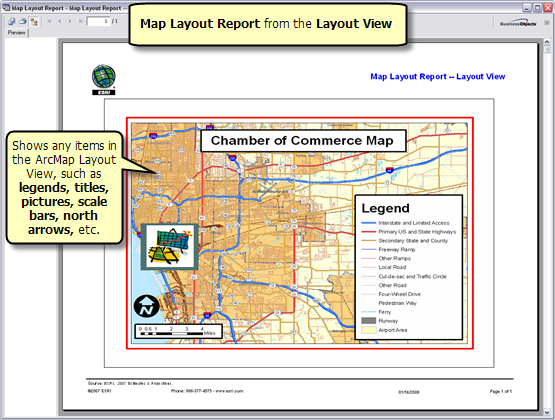
  • If the ArcMap layout view is open, a report is returned with what is shown in the view, along with any marginalia, such as a map legend, a scale bar, your logos, and a north arrow.
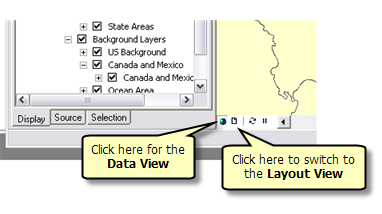
Switching from Data View to Layout View

Below are visual examples of the outputs for map layout reports using the data view and layout view.
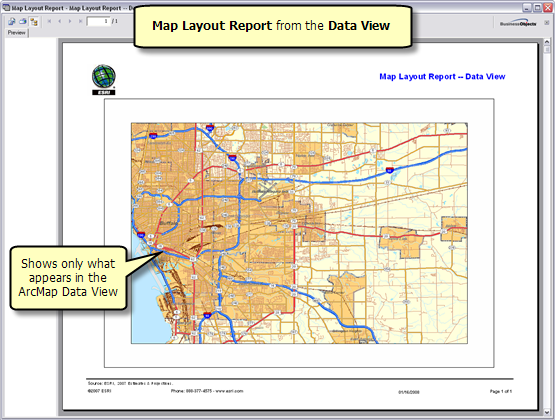
Data View
Layout View

Example of a map series

This example shows the Map Layout report using the Create Series of Maps option. You can start with a trade area layer that includes several polygons and convert them to reports or images (JPEG, BMP). In this example, multiple drive-time trade areas are exported to image files. A separate file is created for each trade area ID.
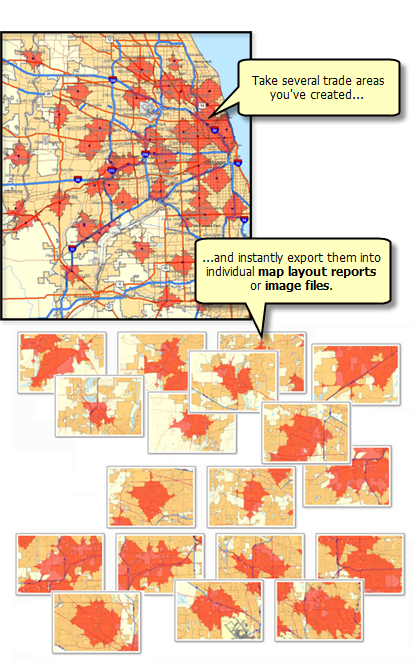
Map Series
Feedback on this topic?

ArcGIS for Desktop

  • Home
  • Documentation
  • Pricing
  • Support

ArcGIS Platform

  • ArcGIS Online
  • ArcGIS for Desktop
  • ArcGIS for Server
  • ArcGIS for Developers
  • ArcGIS Solutions
  • ArcGIS Marketplace

About Esri

  • About Us
  • Careers
  • Insiders Blog
  • User Conference
  • Developer Summit
Esri
© Copyright 2016 Environmental Systems Research Institute, Inc. | Privacy | Legal