ArcGIS for Desktop

  • Documentation
  • Pricing
  • Support

  • My Profile
  • Help
  • Sign Out
ArcGIS for Desktop

ArcGIS Online

The mapping platform for your organization

ArcGIS for Desktop

A complete professional GIS

ArcGIS for Server

GIS in your enterprise

ArcGIS for Developers

Tools to build location-aware apps

ArcGIS Solutions

Free template maps and apps for your industry

ArcGIS Marketplace

Get apps and data for your organization

  • Documentation
  • Pricing
  • Support
Esri
  • Sign In
user
  • My Profile
  • Sign Out

Help

  • Home
  • Get Started
  • Map
  • Analyze
  • Manage Data
  • Tools
  • More...

Business Analyst

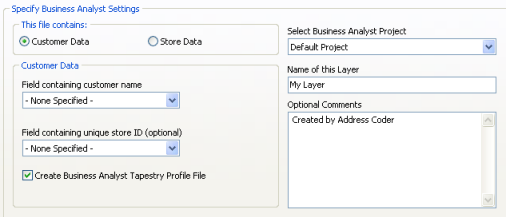
If you have ArcGIS with Business Analyst installed on your system and you are creating shapefile output, you can instruct Address Coder to add the output as a layer to a specific Business Analyst project.

You will need to indicate whether the file being processed contains customer or store information.

If it contains customer information, you must specify the field that contains your customer names. In addition, you can optionally link each record to a specific store if a unique ID is contained in the file.
Note:

If you check the Create Business Analyst Tapestry Profile File check box, Address Coder automatically creates a Tapestry Profile report. It also forces the use of block groups as the profile base.

Specify Business Analyst settings

If the file contains store information, you must identify the fields containing the store name and its unique ID. If the file doesn't contain a unique ID field, you can create one.
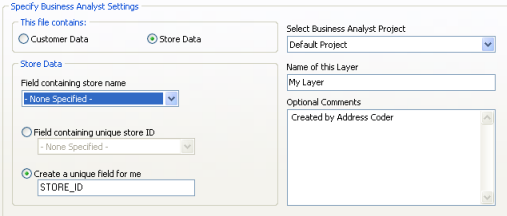
Specify Business Analyst Settings
Feedback on this topic?

ArcGIS for Desktop

  • Home
  • Documentation
  • Pricing
  • Support

ArcGIS Platform

  • ArcGIS Online
  • ArcGIS for Desktop
  • ArcGIS for Server
  • ArcGIS for Developers
  • ArcGIS Solutions
  • ArcGIS Marketplace

About Esri

  • About Us
  • Careers
  • Insiders Blog
  • User Conference
  • Developer Summit
Esri
© Copyright 2016 Environmental Systems Research Institute, Inc. | Privacy | Legal