Features of the Roadway Characteristics Editor
The Roadway Characteristics Editor is a web application for adding, selecting, and editing linear referenced event data. Notable features include route searching, attribute set-based route attribution, quality control of events checks, event data query, and event editing and route redlining.
Layout
The Roadway Characteristics Editor layout includes a ribbon toolbar, widgets, results grid, and floating windows.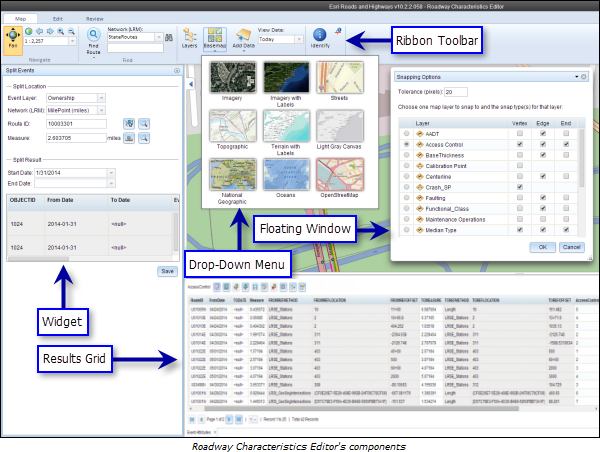
Ribbon toolbar
The ribbon toolbar docks at the top of the editor. It has three tabs, and each tab is divided into groups.
| Tab | Group | Description |
|---|---|---|
Map | Navigate | Navigates the map using pan and zoom controls. |
Find | Searches for routes based on network and route ID. | |
Contents | Adds basemaps and DGN data, and views the table of contents. | |
Identify | Identifies routes and events on the map. | |
Edit | Selection | Selects events on the basis of geometry, attributes, and proximity. |
Edit Events | Adds and edits point and line events, and defines attribute sets. | |
Redline Routes | Adds and edits redlines. | |
Review | QC | Performs quality control checks on a specific route to find gaps, overlaps, and invalid measures in the events. |
Versioning | Reconciles and posts data against other versions. | |
Data Reviewer | Executes Data Reviewer checks on events and views results. | |
Markup | Adds markup symbols to the map for the RCE session. |



Widgets
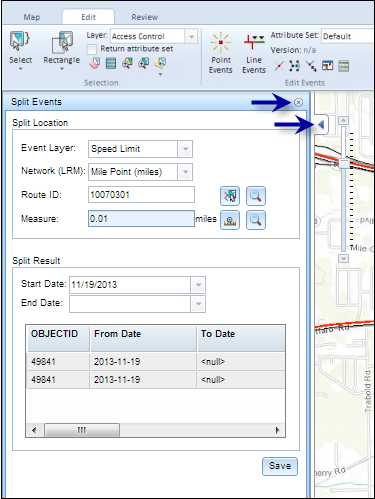
After clicking a menu and selecting a widget, the widget opens. Most of the widgets dock on the left side of the page.
After opening the widget, you can expand or contract the widget to a different size that persists across all sessions.
To minimize the widget, click the left-facing arrow. To close the widget, click the x on the top right.
Results grid
After running many widgets (Select Events, QC), a results grid opens containing event results. By default, the results grid opens at the bottom of the page; however, this is configurable. You can directly edit event records in the results grid. The results grid contains four tools that can help you edit event data: Zoom To (selected events), Select All, Save Changes, and Calculate Field.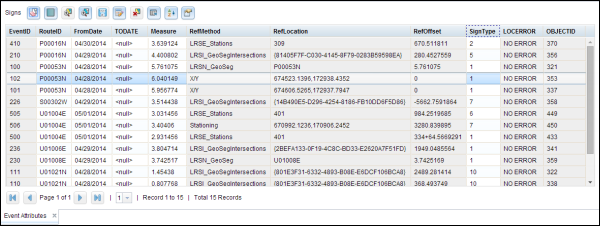
Similar to widgets, you can expand and contract the results grid to a different size that persists across all sessions.
To minimize the results grid, click the down-facing arrow (similar to widgets).