ArcGIS Desktop

  • Documentation
  • Support

  • My Profile
  • Help
  • Sign Out
ArcGIS Desktop

ArcGIS Online

The mapping platform for your organization

ArcGIS Desktop

A complete professional GIS

ArcGIS Enterprise

GIS in your enterprise

ArcGIS for Developers

Tools to build location-aware apps

ArcGIS Solutions

Free template maps and apps for your industry

ArcGIS Marketplace

Get apps and data for your organization

  • Documentation
  • Support
Esri
  • Sign In
user
  • My Profile
  • Sign Out

Help

  • Home
  • Get Started
  • Map
  • Analyze
  • Manage Data
  • Tools
  • More...

Changing the basemap

A basemap is used for locational reference and provides a framework on which users overlay or mash up their operational layers, perform tasks, and visualize geographic information. The basemap serves as a foundation for all subsequent operations and mapping. Basemaps provide the context and a framework for working with information geographically.

The Roadway Characteristics Editor provides the functionality to add and change basemap layers.

  1. Open a web browser and browse to the Roadway Characteristics Editor application.
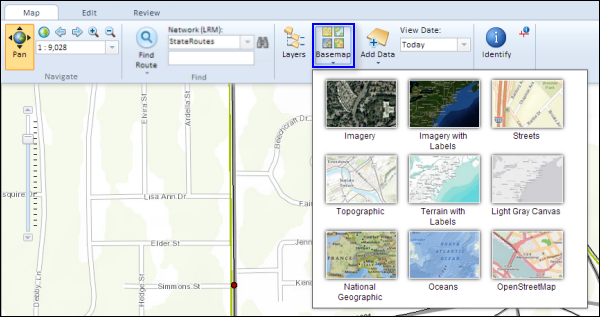
  2. On the Map tab, in the Contents group, click the Basemap button Change Basemap.

    The basemap selector appears.

    Basemap Selector

  3. Select any one of the nine basemap layers to add to your map.

ArcGIS Desktop

  • Home
  • Documentation
  • Support

ArcGIS Platform

  • ArcGIS Online
  • ArcGIS Desktop
  • ArcGIS Enterprise
  • ArcGIS for Developers
  • ArcGIS Solutions
  • ArcGIS Marketplace

About Esri

  • About Us
  • Careers
  • Esri Blog
  • User Conference
  • Developer Summit
Esri
Tell us what you think.
Copyright © 2018 Esri. | Privacy | Legal