Some event editing workflows are associated with an address, and the Find Address tool in the Roadway Characteristics Editor helps to explore the LRS Network. You can search for an address and zoom to its spatial location.
The Find Address tool uses the ArcGIS Online single-line geocoder. You can use another geocoder as long as it is single line. For more information of configuring the geocoder, see Configuring the Roadway Characteristics Editor web application.
- Open a web browser and browse to the Roadway Characteristics Editor.
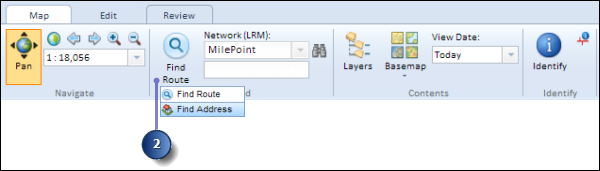
- On the Map tab, in the Find group, click the Find Route button and select Find Address.
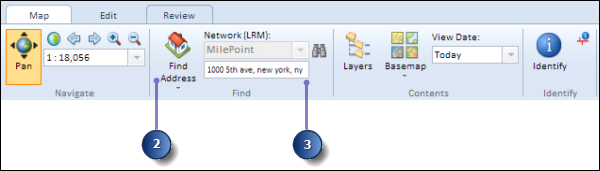
- Enter the address you would like to explore.
The address input does not need to be exact.
- Press the Enter key.
The results of the search operation are populated in the Search Results window below, along with information about the total number of result pages available.
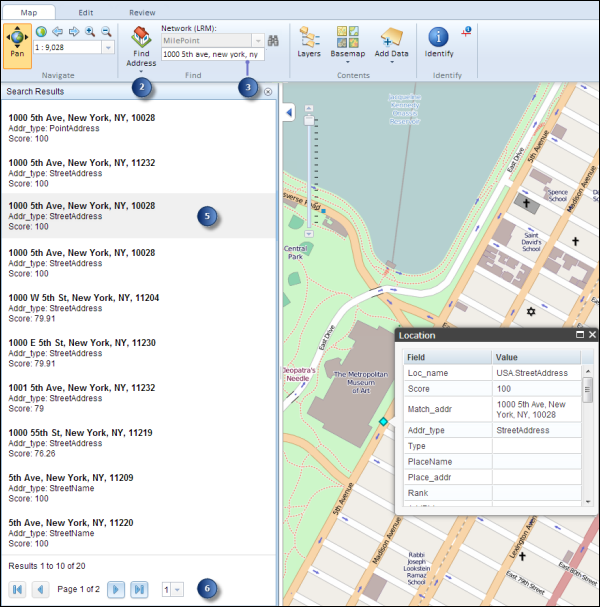
- Click individual rows within the Search Results window and the map refreshes to zoom to the extent of the selected address.
- Explore the results using the navigation buttons at the bottom of the window.
- Click the First Page button
 or Last Page button
  to go to the first or last page of results, respectively.
 - Click the Next Page button
 or Previous Page button
  to go to the next or previous page of results, respectively. Alternatively, you can use the drop-down arrow and choose the page number to directly access a page.
- Click the First Page button