ArcGIS Desktop

  • Documentation
  • Support

  • My Profile
  • Help
  • Sign Out
ArcGIS Desktop

ArcGIS Online

The mapping platform for your organization

ArcGIS Desktop

A complete professional GIS

ArcGIS Enterprise

GIS in your enterprise

ArcGIS for Developers

Tools to build location-aware apps

ArcGIS Solutions

Free template maps and apps for your industry

ArcGIS Marketplace

Get apps and data for your organization

  • Documentation
  • Support
Esri
  • Sign In
user
  • My Profile
  • Sign Out

Help

  • Home
  • Get Started
  • Map
  • Analyze
  • Manage Data
  • Tools
  • More...

Selecting an attribute set as results

The Return Attribute Set option on the Roadway Characteristics Editor allows you to return a selection result as an attribute set, where each layer of the attribute set is dynamically segmented together into one record set.
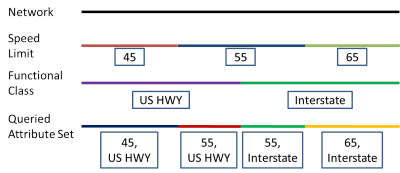
Query Attribute Set
Using the Return Attribute Set option on a network layer will return records separated at any measure along that network where any of the preselected attribute set events change. On a point event layer, the Return Attribute Set option returns the attributes for the entire selected attribute set at each point event. On a line event layer, the Return Attribute Set option returns separate records at any measure along the event where any of the preselected attribute set events change. The process of using Return Attribute Set to return attribute sets for networks, point events, and polyline events is below.

  1. Open a web browser and browse to Roadway Characteristics Editor.
  2. On the Edit ribbon, in the Edit Events group, click the Attribute Set drop-down arrow to choose the attribute set you want to use. To learn more about attribute sets, see Configuring attribute sets.
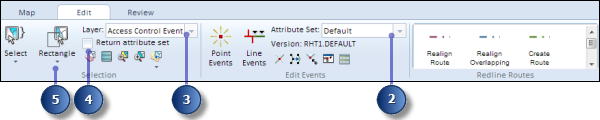
    The Edit ribbon
  3. Click the Layer drop-down arrow to choose the network or event layer for which you want to return attribute sets for.

    Depending on which type of layer you select, the results of your attribute set will be different.

  4. Check the Return attribute set check box to ensure an attribute set will be returned for your selection.
  5. Choose your selection method to select the area of the map you want to return an attribute set for.

    If you have a network or event table open in Roadway Characteristics Editor when querying an attribute set, your open table will be replaced with an attribute set table of your results.

    The selected records are shown in the attribute set table and highlighted on your map.
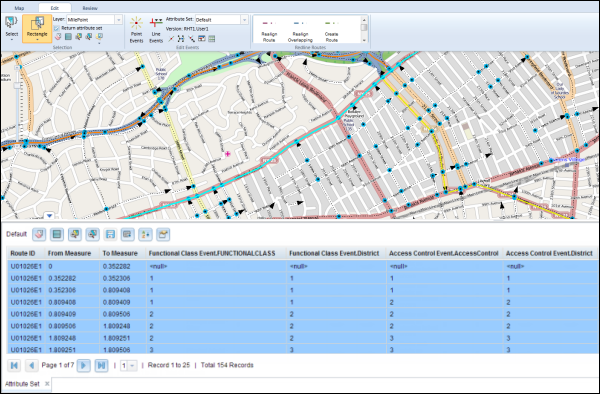
    Results of querying attribute sets
  6. To edit attribute sets, see Configuring attribute sets.

    You can also edit the cells in the attribute set table. The cells in white are editable, and the cells in grey are noneditable. A cell can be noneditable if some other user or the same user in a different version of the database has acquired locks on the event record.

    Note:

    If a message appears that is related to acquiring locks, the need to reconcile, or not being able to acquire locks, and so on, then Roads and Highways conflict prevention is enabled. For more information about these messages, see Conflict prevention in the Roadway Characteristics Editor.

ArcGIS Desktop

  • Home
  • Documentation
  • Support

ArcGIS Platform

  • ArcGIS Online
  • ArcGIS Desktop
  • ArcGIS Enterprise
  • ArcGIS for Developers
  • ArcGIS Solutions
  • ArcGIS Marketplace

About Esri

  • About Us
  • Careers
  • Esri Blog
  • User Conference
  • Developer Summit
Esri
Tell us what you think.
Copyright © 2018 Esri. | Privacy | Legal