ArcGIS Desktop

  • Documentation
  • Support

  • My Profile
  • Help
  • Sign Out
ArcGIS Desktop

ArcGIS Online

The mapping platform for your organization

ArcGIS Desktop

A complete professional GIS

ArcGIS Enterprise

GIS in your enterprise

ArcGIS for Developers

Tools to build location-aware apps

ArcGIS Solutions

Free template maps and apps for your industry

ArcGIS Marketplace

Get apps and data for your organization

  • Documentation
  • Support
Esri
  • Sign In
user
  • My Profile
  • Sign Out

Help

  • Home
  • Get Started
  • Map
  • Analyze
  • Manage Data
  • Tools
  • More...

Splitting a centerline

The Split Centerline tool is one of the centerline feature class editing tools available in Esri Roads and Highways. If you want to create a route that does not span the complete centerline, use this tool to split that centerline into two contiguous parts. Esri Roads and Highways supports splitting a centerline by clicking on it at a specific location as well as splitting a centerline relative to a measure location on a route (see Splitting a centerline by measure). Generally, the Split Centerline tool will be used to split a centerline relative to some feature being snapped to, like an intersection, county boundary, railroad crossing, or some other feature.

Note:

You should not use the Split tool on the ArcMap Editor toolbar to split a centerline. Instead, use the Split Centerline tool on the Roads And Highways Editing toolbar to split a centerline. This tool ensures that when a centerline is split, the source centerline's association to routes in all networks across all time is maintained.

  1. In ArcMap, add the centerline and the network layers to the map.
  2. Start an edit session and zoom to the centerline that you want to split.

    For more information on how to start an edit session, see About edit sessions.

  3. On the Roads And Highways Editing toolbar, click the Split Centerline button Split Centerlines.
  4. Click a point on the centerline where you want it to split.
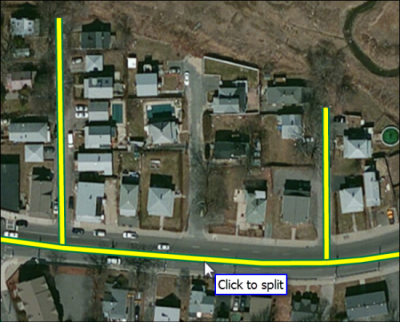
    Splitting a centerline

    The centerlines on both sides of the split location flash in dark green and the centerline splits into two parts.

    Note:

    If additional fields are modeled on the centerlines, attributes from those fields on the centerline being split will be added to the new centerlines resulting from the split.

ArcGIS Desktop

  • Home
  • Documentation
  • Support

ArcGIS Platform

  • ArcGIS Online
  • ArcGIS Desktop
  • ArcGIS Enterprise
  • ArcGIS for Developers
  • ArcGIS Solutions
  • ArcGIS Marketplace

About Esri

  • About Us
  • Careers
  • Esri Blog
  • User Conference
  • Developer Summit
Esri
Tell us what you think.
Copyright © 2018 Esri. | Privacy | Legal