ArcGIS for Desktop

  • Documentation
  • Pricing
  • Support

  • My Profile
  • Help
  • Sign Out
ArcGIS for Desktop

ArcGIS Online

The mapping platform for your organization

ArcGIS for Desktop

A complete professional GIS

ArcGIS for Server

GIS in your enterprise

ArcGIS for Developers

Tools to build location-aware apps

ArcGIS Solutions

Free template maps and apps for your industry

ArcGIS Marketplace

Get apps and data for your organization

  • Documentation
  • Pricing
  • Support
Esri
  • Sign In
user
  • My Profile
  • Sign Out

Help

  • Home
  • Get Started
  • Map
  • Analyze
  • Manage Data
  • Tools
  • More...

Configuring feature templates for a step

A step can be configured for a feature template that will be executed during an edit session. By configuring the feature template for a step, you can streamline the workflow for the end user.

  1. Start ArcMap.
  2. If necessary, click the Task Assistant button Task Assistant on the Task Manager toolbar to display the Task Assistant window.
  3. Open a task assistant workflow.
  4. Click to select the step to configure in the Task Assistant window.
  5. Click the Designer tab.
  6. Click the cell next to Feature Template and click the ellipsis (...) that appears.

    The Feature Template Item Editor dialog box appears.
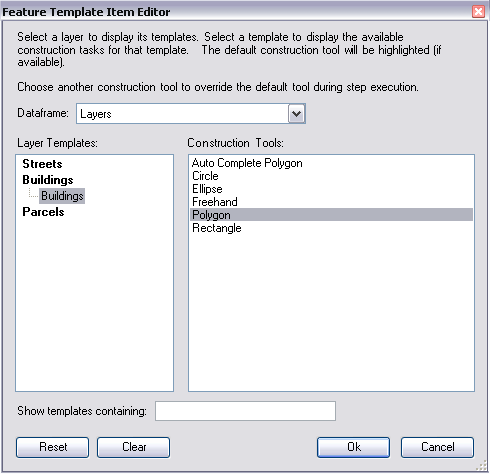
    Feature Template Item Editor dialog box
  7. Highlight the layer containing the feature template to be used and choose the appropriate template. Ensure that the correct construction tool to be used is also highlighted.
  8. Click OK.

    Note:

    Use the Show templates containing text box to filter the list of layers and templates. Clearing the entered text displays all layers and templates.

Feedback on this topic?

ArcGIS for Desktop

  • Home
  • Documentation
  • Pricing
  • Support

ArcGIS Platform

  • ArcGIS Online
  • ArcGIS for Desktop
  • ArcGIS for Server
  • ArcGIS for Developers
  • ArcGIS Solutions
  • ArcGIS Marketplace

About Esri

  • About Us
  • Careers
  • Insiders Blog
  • User Conference
  • Developer Summit
Esri
© Copyright 2016 Environmental Systems Research Institute, Inc. | Privacy | Legal