ArcGIS for Desktop

  • Documentation
  • Pricing
  • Support

  • My Profile
  • Help
  • Sign Out
ArcGIS for Desktop

ArcGIS Online

The mapping platform for your organization

ArcGIS for Desktop

A complete professional GIS

ArcGIS for Server

GIS in your enterprise

ArcGIS for Developers

Tools to build location-aware apps

ArcGIS Solutions

Free template maps and apps for your industry

ArcGIS Marketplace

Get apps and data for your organization

  • Documentation
  • Pricing
  • Support
Esri
  • Sign In
user
  • My Profile
  • Sign Out

Help

  • Home
  • Get Started
  • Map
  • Analyze
  • Manage Data
  • Tools
  • More...

Enabling the Task Assistant designer mode

Task Assistant Manager can be run in two different modes:

  • Task Assistant designer—Allows you to create and execute task assistant workflows
  • Task Assistant user—Allows you to execute task assistant workflows

Although Task Assistant Manager is installed with the Task Assistant user mode by default, you can manually enable the Task Assistant designer mode through the Configuration Manager. Once you enable the Task Assistant designer mode, you have all the tools necessary to create workflows and the steps and tasks that are part of them. You also have tools to validate the workflow. You need administrator privileges to switch to Task Assistant designer mode.

  1. Click Start > All Programs > Task Assistant Manager > Configuration Manager.

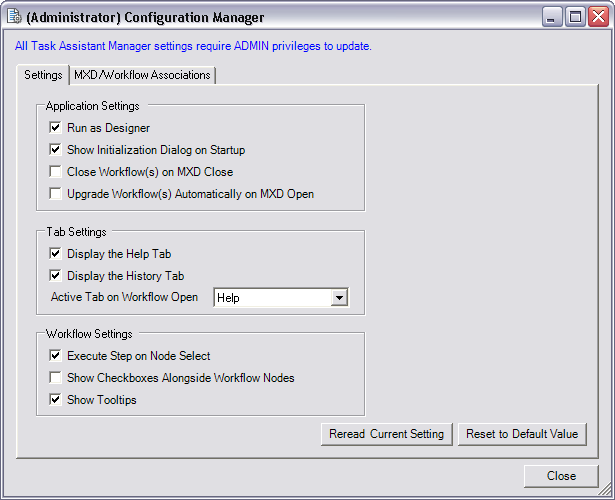
    The (Administrator) Configuration Manager dialog box appears.

    Note:

    If you do not have administrator privileges on the machine, the dialog box title is Configuration Manager, and you cannot change to Task Assistant designer mode.

  2. Click the Settings tab.
    (Administrator) Configuration Manager dialog box
  3. Check the Run as Designer check box.
  4. Click Close.
  5. Tip:

    You can uncheck the Run as Designer check box to return Task Assistant user mode.

Feedback on this topic?

ArcGIS for Desktop

  • Home
  • Documentation
  • Pricing
  • Support

ArcGIS Platform

  • ArcGIS Online
  • ArcGIS for Desktop
  • ArcGIS for Server
  • ArcGIS for Developers
  • ArcGIS Solutions
  • ArcGIS Marketplace

About Esri

  • About Us
  • Careers
  • Insiders Blog
  • User Conference
  • Developer Summit
Esri
© Copyright 2016 Environmental Systems Research Institute, Inc. | Privacy | Legal