ArcGIS for Desktop

  • Documentation
  • Pricing
  • Support

  • My Profile
  • Help
  • Sign Out
ArcGIS for Desktop

ArcGIS Online

The mapping platform for your organization

ArcGIS for Desktop

A complete professional GIS

ArcGIS for Server

GIS in your enterprise

ArcGIS for Developers

Tools to build location-aware apps

ArcGIS Solutions

Free template maps and apps for your industry

ArcGIS Marketplace

Get apps and data for your organization

  • Documentation
  • Pricing
  • Support
Esri
  • Sign In
user
  • My Profile
  • Sign Out

Help

  • Home
  • Get Started
  • Map
  • Analyze
  • Manage Data
  • Tools
  • More...

Using Transaction Tools

At ArcGIS Workflow Manager 10, the transaction tools have been replaced by tools for mining geodatabase archiving information associated with edits made on jobs. You will need to register your layers for transactions again after running the postinstallation to upgrade the schema. The tools for registering transactions are still available in ArcCatalog.

The transaction tools are still available, but they will need to be added via the Customize menu in ArcMap.

  1. In ArcMap, click the Customize menu and click Customize Mode.
  2. On the Customize dialog box, click the Commands tab.
  3. After the tools are loaded, type workflow in the Show commands containing text box to filter the tools.
  4. Choose Workflow Manager Tools in the Categories list.
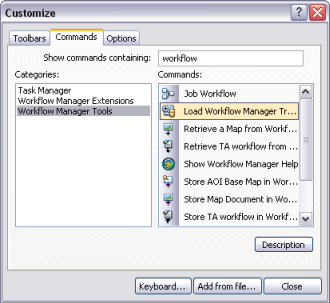
    Customize dialog box

  5. From the list of commands, select and drag the desired transaction tools to a toolbar of your choice.
    • Load Workflow Manager Transactions
    • Workflow Manager Custom Post
    • Workflow Manager Transaction Inspectors
  6. These tools can still be used on your old transactions. You can also use these if you are still tracking transactions on your layers.
Feedback on this topic?

ArcGIS for Desktop

  • Home
  • Documentation
  • Pricing
  • Support

ArcGIS Platform

  • ArcGIS Online
  • ArcGIS for Desktop
  • ArcGIS for Server
  • ArcGIS for Developers
  • ArcGIS Solutions
  • ArcGIS Marketplace

About Esri

  • About Us
  • Careers
  • Insiders Blog
  • User Conference
  • Developer Summit
Esri
© Copyright 2016 Environmental Systems Research Institute, Inc. | Privacy | Legal