ArcGIS for Desktop

  • Documentation
  • Pricing
  • Support

  • My Profile
  • Help
  • Sign Out
ArcGIS for Desktop

ArcGIS Online

The mapping platform for your organization

ArcGIS for Desktop

A complete professional GIS

ArcGIS for Server

GIS in your enterprise

ArcGIS for Developers

Tools to build location-aware apps

ArcGIS Solutions

Free template maps and apps for your industry

ArcGIS Marketplace

Get apps and data for your organization

  • Documentation
  • Pricing
  • Support
Esri
  • Sign In
user
  • My Profile
  • Sign Out

Help

  • Home
  • Get Started
  • Map
  • Analyze
  • Manage Data
  • Tools
  • More...

Adding maps using the Workflow Manager Administrator

Available with Standard or Advanced license.

The maps that are used by your jobs can be stored in the Workflow Manager repository through the Administrator application.

  1. Start Workflow Manager Administrator and connect to your Workflow Manager database.

    There is already a preconfigured map.

  2. Choose the Maps folder.

    If maps already exist, they appear in the list to the right.

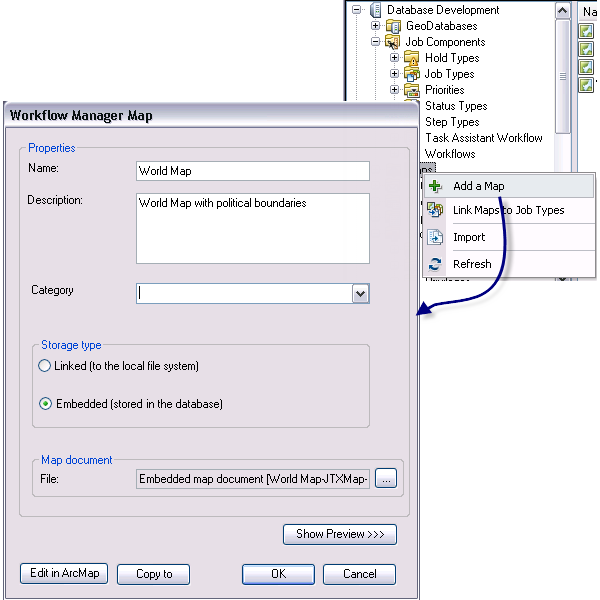
  3. Right-click the Maps folder and click Add a Map.

    The Workflow Manager Map dialog box appears.

  4. Specify the properties of the map—name, description, and category.
  5. Specify how the map will be stored in Workflow Manager.
    • Choose Linked to keep it on a file system.

      Workflow Manager stores the path location of this map document. This is a good option if database space is an issue.

    • Choose Embedded to import the map into the database.
  6. Use the Browse button by the file to navigate to the desired map document.

    The Browse dialog box appears.

  7. Select the file and click Open.
  8. Click OK on the Workflow Manager Map dialog box.

    The map is added to the Workflow Manager system and is ready to be used.
  9. Adding Maps

Feedback on this topic?

ArcGIS for Desktop

  • Home
  • Documentation
  • Pricing
  • Support

ArcGIS Platform

  • ArcGIS Online
  • ArcGIS for Desktop
  • ArcGIS for Server
  • ArcGIS for Developers
  • ArcGIS Solutions
  • ArcGIS Marketplace

About Esri

  • About Us
  • Careers
  • Insiders Blog
  • User Conference
  • Developer Summit
Esri
© Copyright 2016 Environmental Systems Research Institute, Inc. | Privacy | Legal