ArcGIS for Desktop

  • Documentation
  • Pricing
  • Support

  • My Profile
  • Help
  • Sign Out
ArcGIS for Desktop

ArcGIS Online

The mapping platform for your organization

ArcGIS for Desktop

A complete professional GIS

ArcGIS for Server

GIS in your enterprise

ArcGIS for Developers

Tools to build location-aware apps

ArcGIS Solutions

Free template maps and apps for your industry

ArcGIS Marketplace

Get apps and data for your organization

  • Documentation
  • Pricing
  • Support
Esri
  • Sign In
user
  • My Profile
  • Sign Out

Help

  • Home
  • Get Started
  • Map
  • Analyze
  • Manage Data
  • Tools
  • More...

Adding data workspace connections using ArcCatalog

Available with Standard or Advanced license.

In addition to storing the configuration and job information, the Repository also stores the connection information to your spatial data. This information is stored as a Data Workspace connection from within the Workflow Manager Database. You can configure as many data workspace connections as needed.

These connection properties are used when Workflow Manager creates an edit version or launches ArcMap.

  1. Start ArcCatalog, then verify that the Workflow Manager extension is enabled.
  2. From the Workflow Manager Databases node, double-click a database to connect.
  3. Select the Data Workspaces node.
  4. Either right-click the Contents tab or the Data Workspaces node in the Catalog Tree window and select Add Data Workspace.

  5. Add Database Connection
    Add spatial data connection properties to your Workflow Manager system.
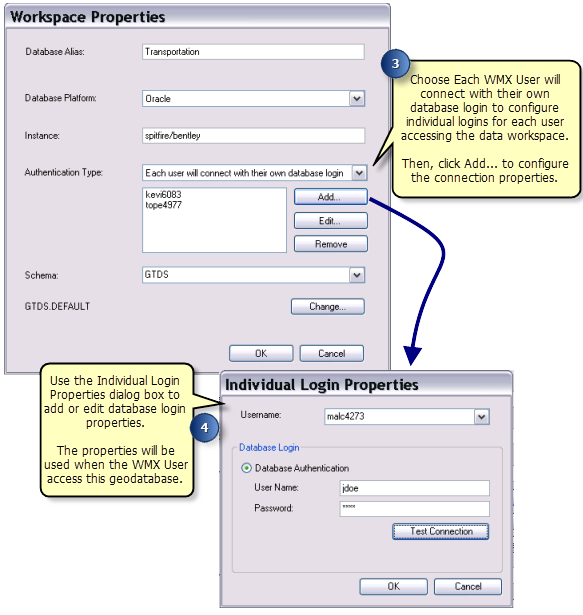
    Data Workspace Individual Logins
    Add individual login properties for each Workflow Manager User accessing the data workspace.
Feedback on this topic?

ArcGIS for Desktop

  • Home
  • Documentation
  • Pricing
  • Support

ArcGIS Platform

  • ArcGIS Online
  • ArcGIS for Desktop
  • ArcGIS for Server
  • ArcGIS for Developers
  • ArcGIS Solutions
  • ArcGIS Marketplace

About Esri

  • About Us
  • Careers
  • Insiders Blog
  • User Conference
  • Developer Summit
Esri
© Copyright 2016 Environmental Systems Research Institute, Inc. | Privacy | Legal