ArcGIS for Desktop

  • Documentation
  • Pricing
  • Support

  • My Profile
  • Help
  • Sign Out
ArcGIS for Desktop

ArcGIS Online

The mapping platform for your organization

ArcGIS for Desktop

A complete professional GIS

ArcGIS for Server

GIS in your enterprise

ArcGIS for Developers

Tools to build location-aware apps

ArcGIS Solutions

Free template maps and apps for your industry

ArcGIS Marketplace

Get apps and data for your organization

  • Documentation
  • Pricing
  • Support
Esri
  • Sign In
user
  • My Profile
  • Sign Out

Help

  • Home
  • Get Started
  • Map
  • Analyze
  • Manage Data
  • Tools
  • More...

Executing reports

Available with Standard or Advanced license.Available with Workflow Manager license.

Workflow Manager reports configured by Workflow Manager Administrator can be viewed in the client application through the Reports view.
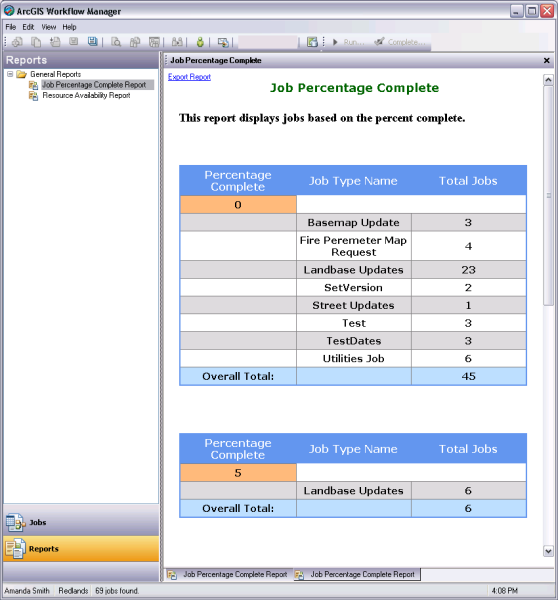
Reports view
Reports configured by Workflow Manager Administrator can be executed from the Reports view.
  1. Start the Workflow Manager application.
  2. Click Reports in the left pane to go to the Reports view.
  3. The list on the left contains the reports created in Workflow Manager Administrator.
  4. Double-click the report to execute it.

    For a dynamic report, provide a value to filter the report.
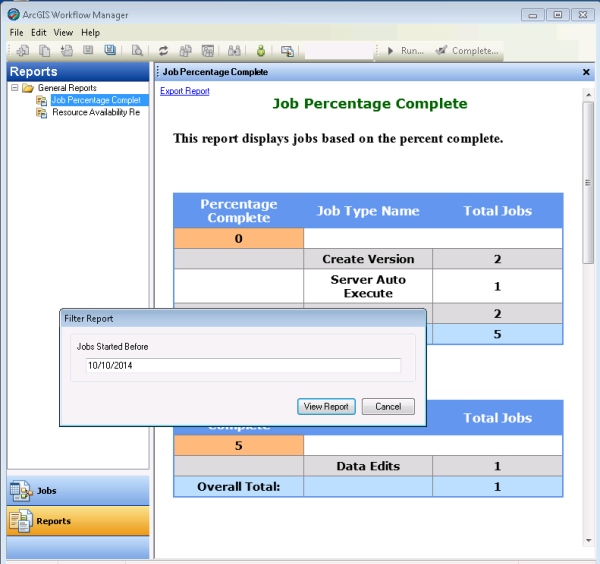
    Dynamic report
    Reports configured with a reporting token need an input value to filter the report.

    The report is displayed in the pane on the right.

  5. Click Export Report at the top of the page to generate an HTML copy of the report.
Feedback on this topic?

ArcGIS for Desktop

  • Home
  • Documentation
  • Pricing
  • Support

ArcGIS Platform

  • ArcGIS Online
  • ArcGIS for Desktop
  • ArcGIS for Server
  • ArcGIS for Developers
  • ArcGIS Solutions
  • ArcGIS Marketplace

About Esri

  • About Us
  • Careers
  • Insiders Blog
  • User Conference
  • Developer Summit
Esri
© Copyright 2016 Environmental Systems Research Institute, Inc. | Privacy | Legal