Available with Standard or Advanced license.
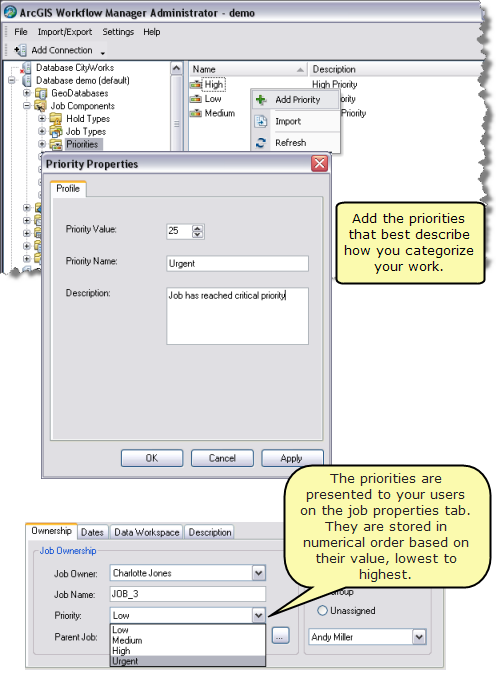
Priorities allow users to place a level of importance on a job. Although not used for any logic in the application, they allow this extra attribute to be placed on the job and therefore used in job queries and reports. You can configure as many priorities as you require. Priorities are configured with three properties: an integer value or priority level, a name, and a description.
An example of the integer-name pairs that are included with the minimum and quick-start configurations for ArcGIS Workflow Manager are below:
- 10—HIGH
- 5—MEDIUM
- 0—LOW
- Open the Workflow Manager Administrator and connect to your Workflow Manager database.
- In the Administrator, navigate to the Priorities folder under the Job Components.
The list will show all the currently configured priorities. If no priorities exist, the list will be blank.
- Right-click and click Add Priority.
The Hold Type Properties dialog box appears.
- Enter a value to represent your priority.
You can use any numbering system. Priorities are presented to users in numerical order in the client application.
- Enter a name.
The name will be presented to the user in the client application.
- Optionally, enter a description.
- Click OK to save changes and close the dialog box.