ArcGIS for Desktop

  • Documentation
  • Pricing
  • Support

  • My Profile
  • Help
  • Sign Out
ArcGIS for Desktop

ArcGIS Online

The mapping platform for your organization

ArcGIS for Desktop

A complete professional GIS

ArcGIS for Server

GIS in your enterprise

ArcGIS for Developers

Tools to build location-aware apps

ArcGIS Solutions

Free template maps and apps for your industry

ArcGIS Marketplace

Get apps and data for your organization

  • Documentation
  • Pricing
  • Support
Esri
  • Sign In
user
  • My Profile
  • Sign Out

Help

  • Home
  • Get Started
  • Map
  • Analyze
  • Manage Data
  • Tools
  • More...

Using the relationship viewer

Available with Workflow Manager license.

The relationship viewer is a tool that allows you to quickly access jobs that are related to any selected job in the list view. This view shows the ancestry of the selected job in a tree, and you can determine if the current job is a parent or a child of any other job.

  1. Select the job from the Jobs Query Result - List View for which you want to view its related jobs.
  2. Click the View Hierarchy of Job relationships button.

    The Relationship Viewer dialog box appears.
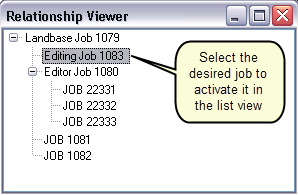
    Relationship Viewer
  3. Click the job listed in the Relationship Viewer dialog box.
    • The selected job becomes the active job in the list view.
    • If the selected job in the viewer was not already displayed on the list view because the query previously executed did not return it, you are prompted to confirm making this the new job displayed in the list view.

    All the related jobs appear in a tree view.

  4. Close the Relationship Viewer dialog box when done.
Feedback on this topic?

ArcGIS for Desktop

  • Home
  • Documentation
  • Pricing
  • Support

ArcGIS Platform

  • ArcGIS Online
  • ArcGIS for Desktop
  • ArcGIS for Server
  • ArcGIS for Developers
  • ArcGIS Solutions
  • ArcGIS Marketplace

About Esri

  • About Us
  • Careers
  • Insiders Blog
  • User Conference
  • Developer Summit
Esri
© Copyright 2016 Environmental Systems Research Institute, Inc. | Privacy | Legal