ArcGIS for Desktop

  • Documentation
  • Pricing
  • Support

  • My Profile
  • Help
  • Sign Out
ArcGIS for Desktop

ArcGIS Online

The mapping platform for your organization

ArcGIS for Desktop

A complete professional GIS

ArcGIS for Server

GIS in your enterprise

ArcGIS for Developers

Tools to build location-aware apps

ArcGIS Solutions

Free template maps and apps for your industry

ArcGIS Marketplace

Get apps and data for your organization

  • Documentation
  • Pricing
  • Support
Esri
  • Sign In
user
  • My Profile
  • Sign Out

Help

  • Home
  • Get Started
  • Map
  • Analyze
  • Manage Data
  • Tools
  • More...

Converting annotation to multiple parts

Multiple-part annotation may be useful if you need to be able to work with a part (such as a word) of an annotation feature but do not want to make it into a completely separate feature. You might want to do this if you have a large feature that you want to identify by spreading out the text of the annotation over the whole shape, such as a long river or mountain range.

  1. Click the Edit Annotation tool Edit Annotation on the Editor toolbar and select the annotation.
  2. Right-click and click Convert to Multiple Parts.
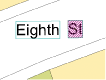
  3. Click the part you want to edit. By default, the part is highlighted in magenta stripes.
  4. Tip:
    The Annotation tab of the Editing Options dialog box allows you to change how parts in multiple-part annotation look when they are selected. By default, selected parts are highlighted in magenta stripes.
    The part you are editing is highlighted in magenta stripes
  5. You can drag the part to a new location or right-click to access other commands.
  6. To convert multiple-part annotation to a single part, select the annotation features, right-click, then click Convert to Single Part.
Feedback on this topic?

ArcGIS for Desktop

  • Home
  • Documentation
  • Pricing
  • Support

ArcGIS Platform

  • ArcGIS Online
  • ArcGIS for Desktop
  • ArcGIS for Server
  • ArcGIS for Developers
  • ArcGIS Solutions
  • ArcGIS Marketplace

About Esri

  • About Us
  • Careers
  • Insiders Blog
  • User Conference
  • Developer Summit
Esri
© Copyright 2016 Environmental Systems Research Institute, Inc. | Privacy | Legal