A raster catalog is a container for raster datasets (for example, grids, DEMs, or imagery). Raster catalogs can be created as unique objects within a geodatabase (the recommended method), or they can be defined using a table. Exploring the contents of geodatabase raster catalogs is different from table-based raster catalogs.
Raster catalogs that are defined using a table appear in ArcCatalog as ordinary tables. The table records define which raster datasets are included in the raster catalog; the raster datasets can be stored in different formats. When displayed, the raster datasets in the raster catalog are drawn in order from the first to the last record in the table. When a raster dataset draws, it may overlap previously drawn raster datasets.
When a raster catalog is drawn, the default renderer for the first raster dataset in the table will be used to draw all the raster datasets. If more than nine raster datasets appear in the display area, you'll see a wireframe illustrating the extent of each raster dataset. If fewer than nine raster datasets appear, the actual raster datasets will be drawn.
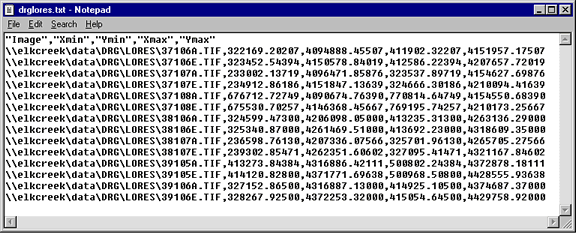
Any table format, including text files and geodatabase tables, can be used to define a raster catalog; the only requirement is that the table contain five columns: IMAGE, XMIN, YMIN, XMAX, and YMAX. The IMAGE column must contain a full path, relative path, UNC path, or environment variable indicating where a raster dataset is located. When relative paths are used, it is relative to the table's location. The remaining columns describe the raster dataset's extent.