The linear referencing system (LRS) supports the use of a single polyline feature class, known as centerlines, to store the geometry for multiple routes. This centerline geometry, along with route definitions, are stored in a network feature class. A many-to-many relationship exists between the routes in the network and centerlines proving the geometry. This means that routes are typically made up of multiple centerline features, and centerline features can participate in multiple routes in multiple networks. The many-to-many relationship between routes and centerlines is maintained through a cross-reference table known as the centerline sequence table. The centerline sequence table contains a reference to each centerline, indicating which routes a given centerline participates in. Because route IDs are not unique in the LRS, the centerline sequence table also contains a reference to the LRS Network, named NetworkId. The combination of NetworkId and RouteId creates a way of uniquely identifying each route in the LRS.

In addition to geometry, routes must also have measures. Measures on routes are what the LRS uses to display event layers in their correct locations on a map. Measures are added to routes through a process known as calibration. To explicitly control how routes are calibrated, the LRS uses a calibration point feature class. Calibration points are point features that store measure values, route references, and network IDs. The combination of these three items constitutes a linear referencing method (LRM). LRMs are created by applying calibration points to routes to create an LRS Network.
By default, the LRS looks for feature classes and tables with a specific set of names:
- Centerline—The polyline feature class that stores the route geometry
- CenterlineSequence—The cross-reference table that manages the relationship between centerline and route
- CalibrationPoint—The point feature class that stores the route measure values
- Redline—The polyline feature class that stores markup features for communicating LRS changes
It is not required that you name your feature classes and tables exactly as described here, but by using the standard naming convention, you can reduce the amount of configuration required during the LRS creation process.
Once LRS creation is finished, the next step is network feature class creation. The network feature class can be modeled before creating the LRS or can be created by Esri Roads and Highways as the network is created within the LRS.
Tolerance and resolution
The data model for Esri Roads and Highways includes multiple feature classes. Because measures and their precision are critical to the accuracy of any LRM, the spatial reference, tolerance, and resolution settings for all of these feature classes must align. This ensures that geometry and measures for routes, events, and intersections are correct in an LRS and remain in alignment. If any of the centerline, calibration point, redline, network, event, or intersection feature classes will be modeled in advance of registering them with the LRS, ensure the tolerance and resolution settings match. Use the information in the table below to assist you when determining the correct spatial reference, tolerance, and resolution settings to use for the centerline, calibration point, redline, network, event, and intersection feature classes in your LRS.
| Feature Class | Spatial Reference | XY Tolerance | XY Resolution | Z Tolerance | Z Resolution | M Tolerance | M Resolution | Additional Information |
|---|---|---|---|---|---|---|---|---|
Source Route data used for loading | NAD 1983 UTM Zone 12N | 0.001 meters | 0.0001 meters | 0.001 meters | 0.0001 meters | 0.001 meters | 0.0001 meters | Spatial Reference, x,y- and z-tolerance and resolution values should be applied to the centerline, calibration point, and redline feature classes. |
Centerline | Same as source routes, NAD 1983 UTM Zone 12N | Same as source routes, 0.001 meters | Same as source routes, 0.0001 meters | Same as source routes, 0.001 meters | Same as source routes, 0.0001 meters | Not m-enabled | Not m-enabled | Spatial Reference, x,y, and z-tolerance and resolution should match that of source routes used for loading. |
Calibration Point | Same as centerline, NAD 1983 UTM Zone 12N | Same as centerline, 0.001 meters | Same as centerline, 0.0001 meters | Same as centerline, 0.001 meters | Same as centerline, 0.0001 meters | Not m-enabled | Not m-enabled | Spatial Reference, x,y-, and z-tolerance and resolution should match the centerline. |
Redline | Same as centerline, NAD 1983 UTM Zone 12N | Same as centerline, 0.001 meters | Same as centerline, 0.0001 meters | Not z- enabled | Not z-enabled | Not m-enabled | Not m-enabled | Spatial Reference and x,y- tolerance and resolution should match centerline. |
Network | Same as centerline, NAD 1983 UTM Zone 12N | Same as centerline, 0.001 meters | Same as centerline, 0.0001 meters | Same as centerline, 0.001 meters | Same as centerline, 0.0001 meters | Depends on unit of measure for the network. If meters, 0.001 meters. If kilometers, 0.000001 km. If miles, 0.000000621369949 miles. | Depends on unit of measure for the network. If meters, 0.0001 meters. If kilometers, 0.0000001 km. If miles, 0.000000062136995 miles. | Spatial Reference, x,y-, and z-tolerance and resolution should match centerline. M-tolerance and resolution based on the spatial reference units of the measure for the network feature class and the units of measure for the LRM being used. See explanation in paragraph below. |
Event | Same as network, NAD 1983 UTM Zone 12N | Same as network, 0.001 meters | Same as network, 0.0001 meters | Same as network, 0.001 meters | Same as network, 0.0001 meters | Same as network. | Same as network. | Spatial Reference, x,y-, z-, and m-tolerance and resolution should match the network with which the event will be registered. |
Intersection | Same as network, NAD 1983 UTM Zone 12N | Same as network, 0.001 meters | Same as network, 0.0001 meters | Same as network, 0.001 meters | Same as network, 0.0001 meters | Same as network. | Same as network. | Spatial Reference, x,y-, z-, and m-tolerance and resolution should match the network with which the intersections will be registered. |
The spatial reference and x,y-, and z-tolerance and resolution of the centerline feature class should match that of any source routes that will be loaded into the network. These settings are propagated to networks, events, and intersections in the LRS.
The calibration point and redline feature class should have the same spatial reference; x,y-, and z-tolerance; and resolution as the centerline feature class.
Networks share the same spatial reference and x,y-, and z-tolerance and resolution from the centerline feature class as well. The M tolerance and resolution for the network will be based on the spatial reference units of measure for the network feature class and the units of measure for the LRM being used. If these units of measure are the same, then the m-tolerance and resolution will be the same as the x,y-tolerance and resolution. If the units of measure are different, you will need to convert the x,y tolerance and resolution to the corresponding m-tolerance and resolution.
For example, suppose your network feature class will have a spatial reference in meters with x,y-tolerance of 0.001 meters and x,y-resolution of 0.0001 meters. If the units of measure for the LRM will be in meters, then the m-tolerance will be 0.001 and the m-resolution will be 0.0001. However, if the units of measure for the LRM will be in kilometers, then the x,y-tolerance and resolution values would need to be converted from meters to kilometers for the m-tolerance and resolution. In this example, the m-tolerance would be 0.000001 and the resolution will be 0.0000001.
Event feature classes will share the same spatial reference and x,y-, z-, and m-tolerance and resolution as the network in which the event is registered.
Intersection feature classes will share the same spatial reference and x,y-tolerance and resolution as the network in which the intersection is a part.
Centerline feature class
The centerline feature class provides a single source of geometry for all LRS Networks you build in an LRS. Every feature in the centerline feature class represents the single, fine-grained unit of the highway. These can be used to represent a one-to-one relationship with routes or be aggregated to form larger routes.
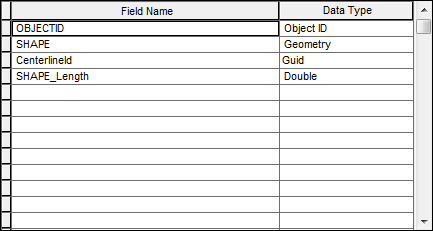
The table below shows the field required in the centerline feature class. If you name your field as described below, the Advanced Linear Reference System setup wizard will recognize the names and configure the LRS accordingly; otherwise, you will be given an opportunity to map to fields having different names to serve the same purpose.
| Field | Data Type | Length | IsNullable | Description |
|---|---|---|---|---|
CenterlineID | GUID | Yes | Unique ID for the centerline geometry |
Centerline sequence table
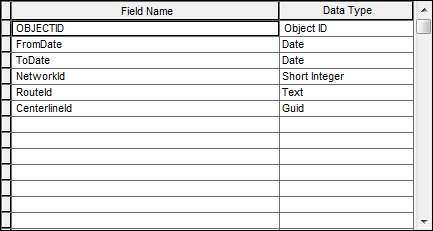
The centerline sequence table acts as a cross-reference table to define the many-to-many relationship between centerlines and routes in the network. One centerline feature can participate in many routes, and a route is can be composed of more than one centerline. The centerline sequence table also contains a network ID to indicate in which LRS Network each route participates. The use of the network ID helps differentiate between LRMs because route IDs may not be unique across networks. Your centerline sequence table must have at least one record for each centerline-network combination. The minimum fields required for centerline sequence are as follows:
| Field | Data Type | Length | IsNullable | Description |
|---|---|---|---|---|
CenterlineID | GUID | Yes | Unique ID for the centerline geometry | |
FromDate | Date | 8 | Yes | Date the portion of the centerline becomes an active part of the route |
ToDate | Date | 8 | Yes | Date the portion of the centerline becomes a retired part of the route |
RouteId | String | 255 | Yes | Unique ID for the route |
NetworkId | Short Integer | 5 | Yes | Unique ID for the LRS network in which each route participates |
Calibration point feature class
Route measures are assigned to routes in the network using the calibration point feature class. Routes are calibrated by calculating an interpolated distance between any two calibration points along the route. Calibration points are specific to an LRS Network and make up the measure component of the LRM. You should follow these rules for calibration point placement to get the best possible calibration of your routes:
- You must have one set of calibration points for each LRS Network in your LRS.
- You must have a minimum of two calibration points per contiguous route section, ideally at the ends of each contiguous section.
- Calibration points should be monotonic, meaning strictly increasing or strictly decreasing. Non-monotonic routes will calibrate, but event locations will be difficult to manage, and event behavior may be unpredictable.
- Add a calibration point if you want to lock down a particular location with a specific measure value.
| Field | Data Type | Length | IsNullable | Description |
|---|---|---|---|---|
Measure | Double | 8 | Yes | Measure value to be stored on routes in an LRS Network |
FromDate | Date | 8 | Yes | Date the calibration point becomes active |
ToDate | Date | 8 | Yes | Date the calibration point is retired |
RouteId | String | 255 | Yes | Unique identifier of the route |
NetworkId | Short Integer | 5 | Yes | Unique identifier of the LRS Network |
Geoprocessing tools are provided to help generate calibration points, update calibration points, and detect nonmonotonic calibration on your routes. See Generate Calibration Points, Update Calibration Points, and Detect NonMonotonic Routes.

Redline feature class
The redline feature class contains the basic information required to perform many of the route editing functions available in Esri Roads and Highways. The redline feature can be thought of as a placeholder for a future route editing operation. It is used as a markup feature so that LRS users don't have to be LRS maintainers. It can be disruptive to a user's workflow to discover differences between the LRS and the real world. Instead of stopping work to wait for the LRS to be updated, you can enter a redline feature into the geodatabase to indicate where the route should be, notify the GIS team, and continue working with your event data.
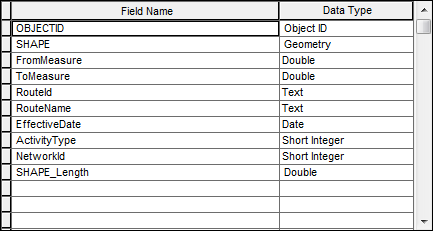
The following are the minimum required attributes for the redline feature class:
| Field | Data Type | Length | IsNullable | Description |
|---|---|---|---|---|
FromMeasure | Double | 8 | Yes | Starting measure of the alignment change. |
ToMeasure | Double | 8 | Yes | Ending measure of the alignment change. |
RouteId | String | 255 | Yes | Unique identifier for the target route. |
RouteName | String | 38 | Yes | Optional name for the route. |
EffectiveDate | Date | 8 | Yes | Date the route change becomes effective. This date will be applied to events affected by the change. |
ActivityType | Short Integer | 5 | Yes | Type of change being made; for example, Realign Route, Extend Route, and so on. |
NetworkId | Short Integer | 5 | Yes | Unique identifier of the LRS Network. |
Redline features can be entered as accurately or as generally as you like. It is expected that a GIS analyst will verify the redline feature and ensure that accurate geometry is entered into the database. A roughly sketched redline indicates that a change to the LRS is required and provides a general location, but it will be up to the GIS analyst to research the requested change and add the data into the GIS correctly.
Network feature class
The network feature class contains the route features for use in the LRS. These routes have attributes, geometry that comes from the centerline feature class, and calibration that comes from the calibration point feature class. Combined these elements constitute a route with a LRM that can be used to locate events on that route. Each route should have a unique route identifier, called a routeID. This routeID can be a single field or a concatenation of multiple fields. If the network will use a concatenated routeID, all the fields that compose the routeID should be present in the network feature class, in addition to the routeID field.
The following are the minimum required attributes for the network feature class:
| Field | Data Type | Length | IsNullable | Description |
|---|---|---|---|---|
FromDate | Date | 8 | Yes | Date the portion of centerline becomes an active part of the route |
ToDate | Date | 8 | Yes | Date the portion of centerline becomes a retired part of the route |
RouteId | String | 255 | Yes | Unique ID for the route |

The following are optional attributes that could be configured for the network feature class:
| Field | Data Type | Length | IsNullable | Description |
|---|---|---|---|---|
RouteName | String | 255 | Yes | The name of the route. |
Fields that compose the routeID | String, Short Integer, and Long Integer | <= routeID field length | Yes | Each field that composes the concatenated routeID for the network. Each field should be model separately in the network feature class. |

Events and Intersections
For information on the event data model, see Events data model.
For information on the intersection data model, see Creating an LRS intersection class.