ArcGIS for Desktop

  • Documentation
  • Pricing
  • Support

  • My Profile
  • Help
  • Sign Out
ArcGIS for Desktop

ArcGIS Online

The mapping platform for your organization

ArcGIS for Desktop

A complete professional GIS

ArcGIS for Server

GIS in your enterprise

ArcGIS for Developers

Tools to build location-aware apps

ArcGIS Solutions

Free template maps and apps for your industry

ArcGIS Marketplace

Get apps and data for your organization

  • Documentation
  • Pricing
  • Support
Esri
  • Sign In
user
  • My Profile
  • Sign Out

Help

  • Home
  • Get Started
  • Map
  • Analyze
  • Manage Data
  • Tools
  • More...

Feature templates and the parcel fabric

Available with Standard or Advanced license.

  • What are feature templates?
  • Feature templates and the parcel fabric

What are feature templates?

In the ArcGIS editing environment, features are created through the use of feature templates. Feature templates define all the information required to create a feature: the layer where a feature will be stored, the attributes a feature is created with, and the default tool used to create that feature. If templates are not present when you start editing, they are automatically created for each layer in the current editing workspace. Templates are saved in the map document (.mxd) and the layer file (.lyr).

Learn more about feature templates

Feature templates and the parcel fabric

Feature templates are created for parcel fabric sublayers in the current editing workspace. When defining feature templates for a parcel fabric sublayer, you do not need to set a default tool, as parcels are created and edited with only one tool in the parcel fabric.

Feature templates can help maximize editing efficiency and minimize attribution error. For example, when creating parcels, you can use a template on the lines sublayer that sets a specific accuracy and category value for a particular line type. In the following example, feature templates are defined on the parcel fabric lines sublayer, which is displayed by line type. The Boundary template sets the line category to 0 (Boundary) and the line accuracy to 3.
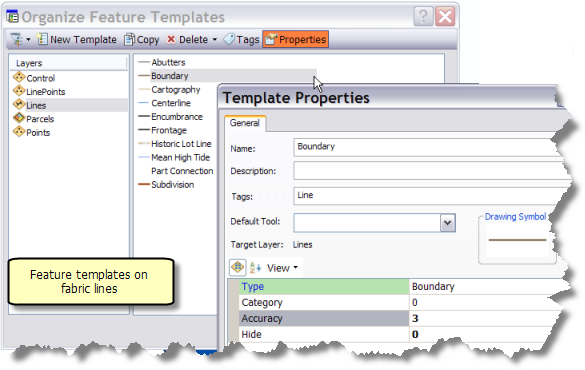
Creating feature templates for the parcel fabric layer
Use a feature template to set Accuracy and Category values for the Boundary line type.

In the parcel traverse grid, when the Boundary template is specified for a parcel traverse line, the line category is automatically set to 0 and the line accuracy is set to 3.

Any additional attributes that you add to fabric tables can also be automatically populated with specific values through a feature template.

Note:

Feature templates in the parcel fabric can only be applied to new parcels created through the New Parcel, Parcel Division, Parcel Merge, Parcel Remainder, and Construction tools.

Tip:

When the parcel fabric is enabled with the Local Government Information Model, feature templates are used to maximize the efficiency of tax parcel editing in the parcel fabric.

Feedback on this topic?

ArcGIS for Desktop

  • Home
  • Documentation
  • Pricing
  • Support

ArcGIS Platform

  • ArcGIS Online
  • ArcGIS for Desktop
  • ArcGIS for Server
  • ArcGIS for Developers
  • ArcGIS Solutions
  • ArcGIS Marketplace

About Esri

  • About Us
  • Careers
  • Insiders Blog
  • User Conference
  • Developer Summit
Esri
© Copyright 2016 Environmental Systems Research Institute, Inc. | Privacy | Legal