When new rules are added to accommodate new requirements, you might also need to change the order of the rules to ensure that the representation and text string rules are applied in the correct order.
The specification rule order determines the order in which rules are applied to your data. Specification rules are processed based on their Processing Order value—from lowest to highest—meaning that the results of one can be overwritten by the result of another. For example, given two specification rules—one that selects all features that have height field values greater than 0 and a second rule that selects features that have height field values between 5 and 10—the processing order is important, because if the specification rule that selects features with a height value between 5 and 10 is processed first (because it was created first), the rule for features with a height value greater than 0 will override the first rule's results. The Rule Order value shown in the rules table indicates the order in which the rules have been created, so it may be necessary to reorder the rules so they are applied in the order you want.
- Start ArcMap.
- If necessary, load data in the map.
- Choose the layer that contains the specification rules to reorder.
- Right-click the layer and click Properties.
The Layer Properties dialog box appears.
- Click the Calculated Representations tab.
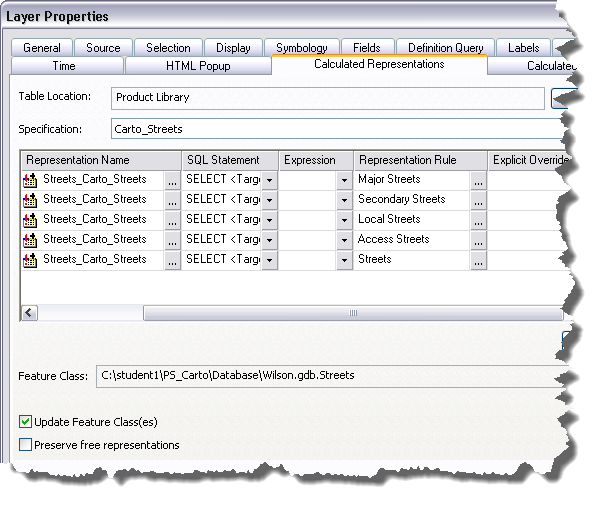
- Select the rules to move in the rules list.
- Right-click the selection, point to Processing Order, and choose the option you want to use to move the rules.
- Move Up—Moves the selected rule or group of consecutive rules up one row within its specification
- Move Down—Moves the selected rule or group of consecutive rules down one row within its specification
- Move to Top—Moves the selected rule or group of consecutive rules to the top of the list of rules for its specification
- Move to Bottom—Moves the selected rule or group of consecutive rules to the bottom of the list of rules for its specification
- Move to Top Tightly—Moves a nonconsecutive group of rules to the top of the list of rules for its specification while retaining its processing order.
- Move to Bottom Tightly—Moves a nonconsecutive group of rules to the bottom of the list of rules for its specification while retaining its order.
- Click Apply.
The map is redrawn using the new rule order. Depending on the calculation method you are using, the processing order may be applied immediately.
- Click OK.