ArcGIS Desktop

  • Documentación
  • Soporte

  • My Profile
  • Ayuda
  • Sign Out
ArcGIS Desktop

ArcGIS Online

La plataforma de representación cartográfica para tu organización

ArcGIS Desktop

Un completo SIG profesional

ArcGIS Enterprise

SIG en tu empresa

ArcGIS for Developers

Herramientas para crear aplicaciones basadas en la ubicación

ArcGIS Solutions

Plantillas de aplicaciones y mapas gratuitas para tu sector

ArcGIS Marketplace

Obtén aplicaciones y datos para tu organización.

  • Documentación
  • Soporte
Esri
  • Iniciar sesión
user
  • Mi perfil
  • Cerrar sesión

Help

  • Inicio
  • Introducción
  • Mapa
  • Analizar
  • Administrar datos
  • Herramientas
  • Más...

Undoing the checkout for a file

You can undo the checkout of a file if you did not make any changes or if you do not want any of the changes you made to be saved.

  1. Start ArcMap.
  2. If necessary, open the Product Library window by clicking Customize > Production > Product Library on the main menu.

    A tree view of the product library appears.
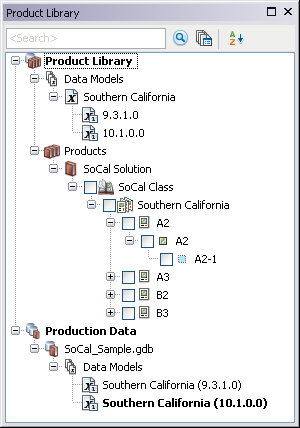
    Product Library tree view
  3. Click the Manage Files button Manage Files on the Product Library window.

    The file manager appears.
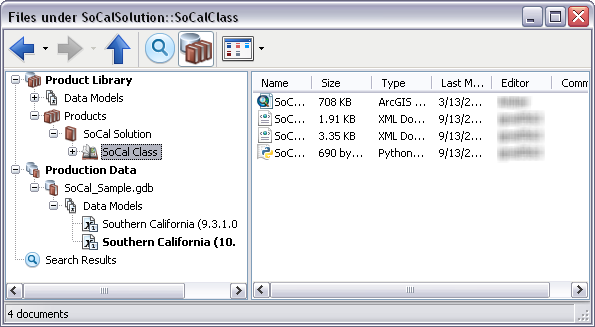
    Default view of the file manager
  4. Navigate to the file.

    Sugerencia:

    You can also search for the file if you don't know where it is located.

  5. Right-click the file and click Undo Checkout Document.

    The Undo Checkout Document dialog box appears asking you if you want to undo the changes since the last checkout.

  6. Click Yes to undo the changes and the checkout.

The file checkout is undone.

ArcGIS Desktop

  • Inicio
  • Documentación
  • Soporte

Plataforma ArcGIS

  • ArcGIS Online
  • ArcGIS Desktop
  • ArcGIS Enterprise
  • ArcGIS for Developers
  • ArcGIS Solutions
  • ArcGIS Marketplace

Acerca de Esri

  • Quiénes somos
  • Empleo
  • Blog interno
  • Conferencia de usuarios
  • Cumbre de desarrolladores
Esri
Díganos su opinión.
Copyright © 2017 Esri. | Privacidad | Legal