ArcGIS Desktop

  • ArcGIS Pro
  • ArcMap

  • My Profile
  • Ayuda
  • Sign Out
ArcGIS Desktop

ArcGIS Online

La plataforma de representación cartográfica para tu organización

ArcGIS Desktop

Un completo SIG profesional

ArcGIS Enterprise

SIG en tu empresa

ArcGIS for Developers

Herramientas para crear aplicaciones basadas en la ubicación

ArcGIS Solutions

Plantillas de aplicaciones y mapas gratuitas para tu sector

ArcGIS Marketplace

Obtén aplicaciones y datos para tu organización.

  • Documentación
  • Soporte
Esri
  • Iniciar sesión
user
  • Mi perfil
  • Cerrar sesión

ArcMap

  • Home
  • Get Started
  • Map
  • Analyze
  • Manage Data
  • Tools
  • Extensions

Creating chart leads for selected features

The Chart Leads tool creates chart leads for selected features intersecting the data frame. Before the tool is run, the chart leads properties must be configured.

  1. Inicie ArcMap.
  2. Make sure that the production properties are set correctly.

    Properties include the product library workspace, production database workspace, Data Model Version, and Instances Maintained. The Data Model Version needs to be set to an AIS-based data model.

  3. Configure the chart leads properties if you have not done so already.
  4. Ensure that your chart's data frame is set to the appropriate instance by right-clicking the data frame, clicking Properties, then clicking the Product Library tab.
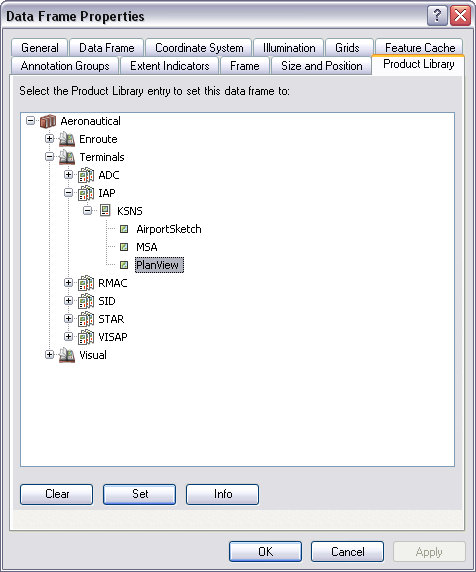
    Data Frame Properties dialog box
    Nota:

    The data frame's coordinate system must match the product AOI extent's coordinate system in the product library.

  5. Select the line features for which to create chart leads.

    Sugerencia:

    Modify the selectable layers if necessary.

  6. On the main menu, click View > Layout View.
  7. On the main menu, click Customize > Toolbars > Aviation Layout.
  8. Click the Chart Leads button Chart Leads on the Aviation Layout toolbar.

Chart leads are created for the selected line features.

ArcGIS Desktop

  • Inicio
  • Documentación
  • Soporte

Plataforma ArcGIS

  • ArcGIS Online
  • ArcGIS Desktop
  • ArcGIS Enterprise
  • ArcGIS for Developers
  • ArcGIS Solutions
  • ArcGIS Marketplace

Acerca de Esri

  • Quiénes somos
  • Empleo
  • Blog de Esri
  • Conferencia de usuarios
  • Cumbre de desarrolladores
Esri
Díganos su opinión.
Copyright © 2020 Esri. | Privacidad | Legal