ArcGIS Desktop

  • ArcGIS Pro
  • ArcMap

  • My Profile
  • Ayuda
  • Sign Out
ArcGIS Desktop

ArcGIS Online

La plataforma de representación cartográfica para tu organización

ArcGIS Desktop

Un completo SIG profesional

ArcGIS Enterprise

SIG en tu empresa

ArcGIS for Developers

Herramientas para crear aplicaciones basadas en la ubicación

ArcGIS Solutions

Plantillas de aplicaciones y mapas gratuitas para tu sector

ArcGIS Marketplace

Obtén aplicaciones y datos para tu organización.

  • Documentación
  • Soporte
Esri
  • Iniciar sesión
user
  • Mi perfil
  • Cerrar sesión

ArcMap

  • Home
  • Get Started
  • Map
  • Analyze
  • Manage Data
  • Tools
  • Extensions

Creating the Holding Pattern Entry Diagram

The Holding Pattern Entry Diagram (HPED) tool creates holding pattern entry diagrams for designated holding pattern features in the current procedure.

  1. Inicie ArcMap.
  2. Ensure that the data model version is set to the AIS Charting model under the Production Database node in the Product Library window.
  3. If AIS Charting has been set as the data model version, it appears in boldface on the Product Library window under Production Database. If it is not, right-click the AIS Charting data model and click Set As Active.
  4. Ensure that your chart's data frame is set to the appropriate instance by right-clicking the data frame, selecting Properties, and clicking the Product Library tab.
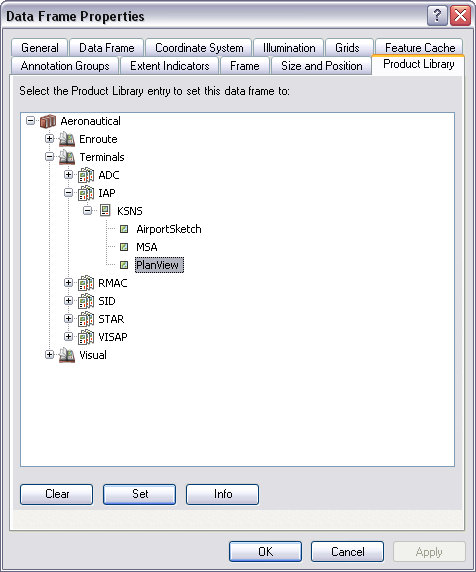
    Data Frame Properties dialog box

  5. Click OK.

    Nota:

    The creation of an HPED is based on the data in the production database and the instance designated on the Data Frame Properties dialog box. To designate a holding pattern feature for HPED creation, change the HPEntry_Code field on the holding pattern ProcedureLeg_C feature to Yes. The HPED tool will create an entry diagram for that procedure leg.

  6. On the main menu, click View > Layout View.
  7. On the main menu, click Customize > Toolbars > Aviation Terminal Procedure.
  8. Click the Holding Pattern Entry Diagram button Holding Pattern Entry Diagram on the Aviation Terminal Procedures toolbar.

    Sugerencia:

    If information on the procedure where the HPED resides changes, and that information affects the HPED, you can regenerate it by clicking the Holding Pattern Entry Diagram button again.

ArcGIS Desktop

  • Inicio
  • Documentación
  • Soporte

Plataforma ArcGIS

  • ArcGIS Online
  • ArcGIS Desktop
  • ArcGIS Enterprise
  • ArcGIS for Developers
  • ArcGIS Solutions
  • ArcGIS Marketplace

Acerca de Esri

  • Quiénes somos
  • Empleo
  • Blog de Esri
  • Conferencia de usuarios
  • Cumbre de desarrolladores
Esri
Díganos su opinión.
Copyright © 2020 Esri. | Privacidad | Legal