ArcGIS Desktop

  • Documentación
  • Soporte

  • My Profile
  • Ayuda
  • Sign Out
ArcGIS Desktop

ArcGIS Online

La plataforma de representación cartográfica para tu organización

ArcGIS Desktop

Un completo SIG profesional

ArcGIS Enterprise

SIG en tu empresa

ArcGIS for Developers

Herramientas para crear aplicaciones basadas en la ubicación

ArcGIS Solutions

Plantillas de aplicaciones y mapas gratuitas para tu sector

ArcGIS Marketplace

Obtén aplicaciones y datos para tu organización.

  • Documentación
  • Soporte
Esri
  • Iniciar sesión
user
  • Mi perfil
  • Cerrar sesión

ArcMap

  • Inicio
  • Introducción
  • Cartografiar
  • Analizar
  • Administrar datos
  • Herramientas
  • Extensiones

Defining the table cell format

Table cell formatting allows you to configure cell width and height and the unit measurements for each.

  1. Verify that you are in layout view if necessary.
  2. Right-click the graphic table element and click Properties.

    The Table Properties dialog box appears.

  3. Click the Table Format tab if necessary.

    The Table Format dialog box appears.

  4. Click Table Design.

    A Table Design dialog box appears, depending on the table format.

  5. Access the Properties dialog box in one of the following ways:
    • Click a cell in the Table Layout area and click Table Layout > Cell Properties.
    • Right-click a table cell in the Table Layout area and click Properties.

    The Properties dialog box appears.
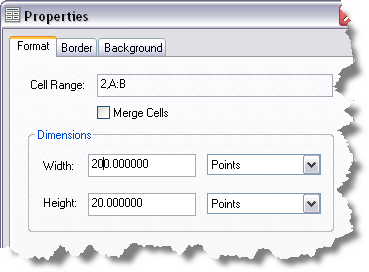
    Properties dialog box
  6. Click the Format tab if necessary.
  7. Type a cell width in the Width text box.
  8. Type a cell height in the Height text box.
  9. Click the units drop-down arrow for each and choose the unit of measurement you want to use.
  10. Click OK.

Temas relacionados

  • What is a graphic table element?
  • A quick tour of the graphic table element

ArcGIS Desktop

  • Inicio
  • Documentación
  • Soporte

Plataforma ArcGIS

  • ArcGIS Online
  • ArcGIS Desktop
  • ArcGIS Enterprise
  • ArcGIS for Developers
  • ArcGIS Solutions
  • ArcGIS Marketplace

Acerca de Esri

  • Quiénes somos
  • Empleo
  • Blog interno
  • Conferencia de usuarios
  • Cumbre de desarrolladores
Esri
Díganos su opinión.
© Copyright 2016 Environmental Systems Research Institute, Inc. | Privacidad | Legal