ArcGIS Desktop

  • Documentación
  • Soporte

  • My Profile
  • Ayuda
  • Sign Out
ArcGIS Desktop

ArcGIS Online

La plataforma de representación cartográfica para tu organización

ArcGIS Desktop

Un completo SIG profesional

ArcGIS Enterprise

SIG en tu empresa

ArcGIS for Developers

Herramientas para crear aplicaciones basadas en la ubicación

ArcGIS Solutions

Plantillas de aplicaciones y mapas gratuitas para tu sector

ArcGIS Marketplace

Obtén aplicaciones y datos para tu organización.

  • Documentación
  • Soporte
Esri
  • Iniciar sesión
user
  • Mi perfil
  • Cerrar sesión

ArcMap

  • Inicio
  • Introducción
  • Cartografiar
  • Analizar
  • Administrar datos
  • Herramientas
  • Extensiones

Grouping the solution metadata fields

You can group the column headings of the solution metadata or sort the column values in ascending or descending order to help you find what you are looking for.

Sugerencia:

The Advanced View command is disabled by default, and you will need to enable it to use it.

  1. Start ArcMap.
  2. If necessary, open the Product Library window by clicking Customize > Production > Product Library on the main menu.

    A tree view of the product library appears.
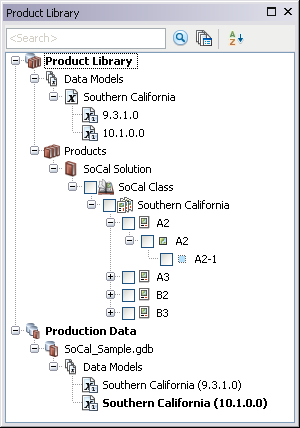
    Product Library tree view
  3. If necessary, expand Product Library and Products.
  4. If necessary, enable the Advanced View command.
  5. Right-click the solution for which you want to view metadata and click Advanced View.

    The Advanced View window appears.

    Advanced View window
    Sugerencia:

    You can sort the column values in ascending or descending order.

  6. Click the name of the column heading and drag it to the area where it says to drag a column header to group by that column.

    Example of dragging a heading

  7. If necessary, click the plus sign (+) to expand the first entry and drag another column heading.
  8. Repeat step 5 as necessary.

    The rows in the window are sorted based on the values for the columns you have chosen.

    Example of grouping column headings
    Sugerencia:

    You can ungroup the fields by dragging the column heading down with the other fields.

ArcGIS Desktop

  • Inicio
  • Documentación
  • Soporte

Plataforma ArcGIS

  • ArcGIS Online
  • ArcGIS Desktop
  • ArcGIS Enterprise
  • ArcGIS for Developers
  • ArcGIS Solutions
  • ArcGIS Marketplace

Acerca de Esri

  • Quiénes somos
  • Empleo
  • Blog interno
  • Conferencia de usuarios
  • Cumbre de desarrolladores
Esri
Díganos su opinión.
© Copyright 2016 Environmental Systems Research Institute, Inc. | Privacidad | Legal