ArcGIS Desktop

  • ArcGIS Pro
  • ArcMap

  • My Profile
  • Ayuda
  • Sign Out
ArcGIS Desktop

ArcGIS Online

La plataforma de representación cartográfica para tu organización

ArcGIS Desktop

Un completo SIG profesional

ArcGIS Enterprise

SIG en tu empresa

ArcGIS Developers

Herramientas para crear aplicaciones basadas en la ubicación

ArcGIS Solutions

Plantillas de aplicaciones y mapas gratuitas para tu sector

ArcGIS Marketplace

Obtén aplicaciones y datos para tu organización.

  • Documentación
  • Soporte
Esri
  • Iniciar sesión
user
  • Mi perfil
  • Cerrar sesión

ArcMap

  • Inicio
  • Introducción
  • Cartografiar
  • Analizar
  • Administrar datos
  • Herramientas
  • Extensiones

Linking maps by scale

The default view of the Split View window is the visual extent of the ArcMap data frame. The Link Maps by Scale tool links the two views by scale so that the scale remains the same in both windows if the Split View window is resized.
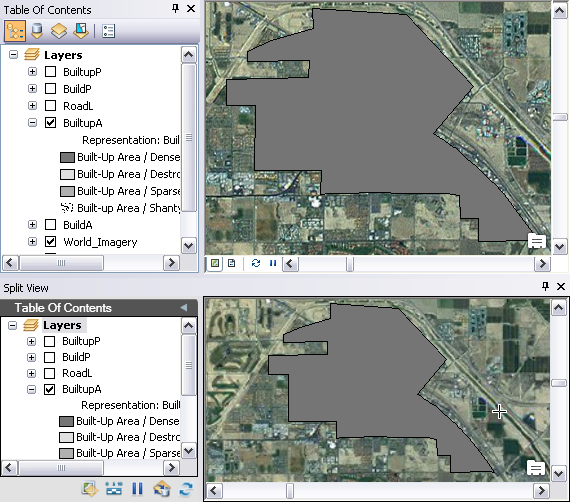
View that is linked by extent
View that is linked by scale
  1. Inicie ArcMap.
  2. On the main menu, click Customize > Toolbars > Defense Mapping.
  3. Click the Split View button Split View on the Defense Mapping toolbar.

    The Split View window appears and contains all the layers in the Table Of Contents window.

    ArcMap and Split View windows
    Sugerencia:

    You can dock the window anywhere inside of ArcMap or move it to another monitor based on your setup needs.

  4. Click the Link Maps By Scale button Link Maps By Scale on the Split View window.

    The Split View window draws the layers based on the scale of the data frame.

ArcGIS Desktop

  • Inicio
  • Documentación
  • Soporte

ArcGIS

  • ArcGIS Online
  • ArcGIS Desktop
  • ArcGIS Enterprise
  • ArcGIS
  • ArcGIS Developer
  • ArcGIS Solutions
  • ArcGIS Marketplace

Acerca de Esri

  • Quiénes somos
  • Empleo
  • Blog de Esri
  • Conferencia de usuarios
  • Cumbre de desarrolladores
Esri
Díganos su opinión.
Copyright © 2021 Esri. | Privacidad | Legal