ArcGIS Desktop

  • ArcGIS Pro
  • ArcMap

  • My Profile
  • Ayuda
  • Sign Out
ArcGIS Desktop

ArcGIS Online

La plataforma de representación cartográfica para tu organización

ArcGIS Desktop

Un completo SIG profesional

ArcGIS Enterprise

SIG en tu empresa

ArcGIS Developers

Herramientas para crear aplicaciones basadas en la ubicación

ArcGIS Solutions

Plantillas de aplicaciones y mapas gratuitas para tu sector

ArcGIS Marketplace

Obtén aplicaciones y datos para tu organización.

  • Documentación
  • Soporte
Esri
  • Iniciar sesión
user
  • Mi perfil
  • Cerrar sesión

ArcMap

  • Inicio
  • Introducción
  • Cartografiar
  • Analizar
  • Administrar datos
  • Herramientas
  • Extensiones

Removing attributes from a list

You can remove the names of attributes that are not in your data. For instance, if the LEN_ field is not in any of your feature classes, you could remove it from the list of available names for the length attribute. You can also choose to restore the default settings for the attributes as needed.

  1. Inicie ArcMap.
  2. On the main menu, click Customize > Toolbars > Defense Mapping.
  3. On the Defense Mapping toolbar, click Defense Mapping > Options.

    The Property Configuration dialog box appears.

  4. If necessary, click the Configuration File drop-down arrow and choose the file that has the configuration settings you want to modify.
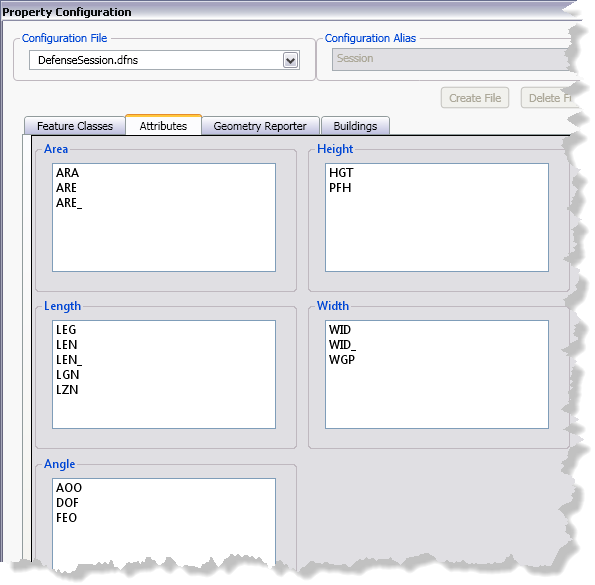
  5. Click the Attributes tab.
    Attributes tab on the Property Configuration dialog box
  6. Right-click the attribute name you want to delete and click Remove selected attribute.

    The attribute is removed from the list.

  7. Repeat step 6 as needed.

    Sugerencia:

    You can save the settings to a configuration file and apply them to another map document.

  8. Haga clic en Aceptar.

ArcGIS Desktop

  • Inicio
  • Documentación
  • Soporte

ArcGIS

  • ArcGIS Online
  • ArcGIS Desktop
  • ArcGIS Enterprise
  • ArcGIS
  • ArcGIS Developer
  • ArcGIS Solutions
  • ArcGIS Marketplace

Acerca de Esri

  • Quiénes somos
  • Empleo
  • Blog de Esri
  • Conferencia de usuarios
  • Cumbre de desarrolladores
Esri
Díganos su opinión.
Copyright © 2021 Esri. | Privacidad | Legal