ArcGIS Desktop

  • ArcGIS Pro
  • ArcMap

  • My Profile
  • Ayuda
  • Sign Out
ArcGIS Desktop

ArcGIS Online

La plataforma de representación cartográfica para tu organización

ArcGIS Desktop

Un completo SIG profesional

ArcGIS Enterprise

SIG en tu empresa

ArcGIS Developers

Herramientas para crear aplicaciones basadas en la ubicación

ArcGIS Solutions

Plantillas de aplicaciones y mapas gratuitas para tu sector

ArcGIS Marketplace

Obtén aplicaciones y datos para tu organización.

  • Documentación
  • Soporte
Esri
  • Iniciar sesión
user
  • Mi perfil
  • Cerrar sesión

ArcMap

  • Inicio
  • Introducción
  • Cartografiar
  • Analizar
  • Administrar datos
  • Herramientas
  • Extensiones

Data source field mapping

Disponible con licencia de Production Mapping.

Table fields are placeholders that can be inserted into cells. Field mapping allows you to map data source fields to table fields. When a data source is not defined, all table fields must be created first. When a data source is defined, table fields are automatically created and mapped to the corresponding data source field. However, when more than one data source is defined, table fields are automatically created and mapped to the corresponding data source field only for fields common to all the data sources.

In addition, you can display feature-coded values in your table by checking the Display coded value descriptions check box.

From the Field Mapping dialog box, you have the ability to assign a value to a field in a number of ways:

  • By setting a custom constant value
  • By using a value from a selected data source field
  • By using a value from a defined expression
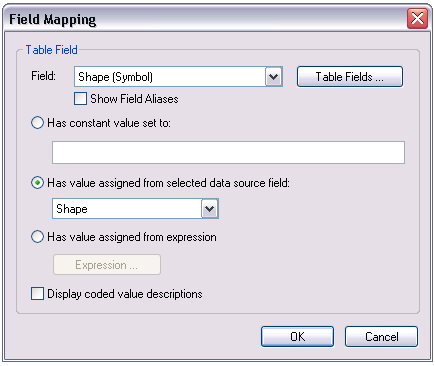
Field Mapping dialog box
Nota:

The Show Field Aliases check box will display the field alias in the dialog box as you create a graphic table element; it will not display the field alias on the graphic table element itself.

In addition, the Table Fields Editor can also be accessed from the Field Mapping dialog box. This allows you to create, delete, or modify the table fields, which can then be mapped to attributes from the data source.

Table Fields Editor dialog box

Temas relacionados

  • What is a graphic table element?
  • A quick tour of the graphic table element

ArcGIS Desktop

  • Inicio
  • Documentación
  • Soporte

ArcGIS

  • ArcGIS Online
  • ArcGIS Desktop
  • ArcGIS Enterprise
  • ArcGIS
  • ArcGIS Developer
  • ArcGIS Solutions
  • ArcGIS Marketplace

Acerca de Esri

  • Quiénes somos
  • Empleo
  • Blog de Esri
  • Conferencia de usuarios
  • Cumbre de desarrolladores
Esri
Díganos su opinión.
Copyright © 2021 Esri. | Privacidad | Legal