ArcGIS Desktop

  • ArcGIS Pro
  • ArcMap

  • My Profile
  • Ayuda
  • Sign Out
ArcGIS Desktop

ArcGIS Online

La plataforma de representación cartográfica para tu organización

ArcGIS Desktop

Un completo SIG profesional

ArcGIS Enterprise

SIG en tu empresa

ArcGIS Developers

Herramientas para crear aplicaciones basadas en la ubicación

ArcGIS Solutions

Plantillas de aplicaciones y mapas gratuitas para tu sector

ArcGIS Marketplace

Obtén aplicaciones y datos para tu organización.

  • Documentación
  • Soporte
Esri
  • Iniciar sesión
user
  • Mi perfil
  • Cerrar sesión

ArcMap

  • Inicio
  • Introducción
  • Cartografiar
  • Analizar
  • Administrar datos
  • Herramientas
  • Extensiones

Managing cells and rows in data source filtering

Disponible con licencia de Production Mapping.

To further refine data source filtering, you can copy, delete, sort rows, or copy cells from the Filter area of the Data Filters dialog box.

  1. Inicie ArcMap.
  2. Verify that you are in layout view if necessary.
  3. Right-click the graphic table element and click Properties.

    The Table Properties dialog box appears.

  4. If necessary, click the Data Source tab.

    The Data Source tab appears.
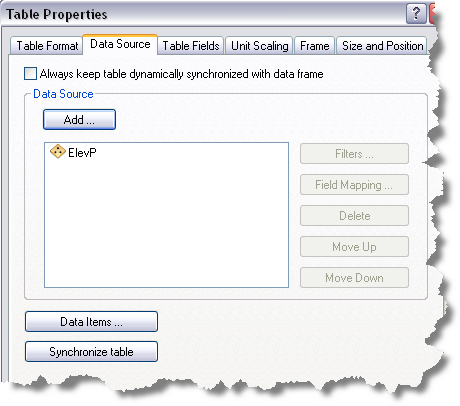
    Data Source tab
  5. Click the data source you want to use in the Data Source list on the Data Source tab.

    The chosen data source is highlighted, and the Filters button becomes available.

  6. Click Filters.

    The Data Filters dialog box appears.

    Data Filters dialog box with filters
  7. Perform one of the following from the Filter area of the Data Filters dialog box, if necessary:
    • To copy a cell, right-click an operator or filter type cell in the Filter area and click Copy Cell.
    • To copy a row, right-click an operator or filter type row in the Filter area and click Copy Selected Row.
    • To delete a row, right-click a row in the Filter area and click Delete.
    • To sort a row, right-click a row in the Filter area and click Move Up or Move Down.
  8. Click OK to save changes to the data filters.

Temas relacionados

  • What is a graphic table element?
  • A quick tour of the graphic table element

ArcGIS Desktop

  • Inicio
  • Documentación
  • Soporte

ArcGIS

  • ArcGIS Online
  • ArcGIS Desktop
  • ArcGIS Enterprise
  • ArcGIS
  • ArcGIS Developer
  • ArcGIS Solutions
  • ArcGIS Marketplace

Acerca de Esri

  • Quiénes somos
  • Empleo
  • Blog de Esri
  • Conferencia de usuarios
  • Cumbre de desarrolladores
Esri
Díganos su opinión.
Copyright © 2021 Esri. | Privacidad | Legal