Disponible con licencia de Production Mapping.
A polygon is a collection of rings. Rings contain collections of points, or vertices, which describe a closed path. The first vertex, number 0, in the outermost ring of a polygon is the origin vertex. Vertices are oriented in a clockwise direction from the origin vertex. The origin vertex is the from-point (and to-point) of the ring that encloses a polygon.
The Set Origin Vertex tool allows you to change the origin vertex of a polygon feature. The following workflows may require you to use this tool:
- Grid and graticules layers—Set an origin location for an area of interest.
- Suppress outline geometry effect—Control where line suppression starts.
- Inicie ArcMap.
-
If necessary, add the Set Origin Vertex tool to a toolbar.
- On the main menu, click Customize > Customize Mode.
- Click the Commands tab.
- Select Production Cartography in the Categories list.
- Locate Set Origin Vertex in the Commands list.
- Drag the Set Origin Vertex command onto a toolbar.
- If necessary, start an edit session.
- Click the Sketch Properties button
 on the Production Editing toolbar.
The Edit Sketch Properties dialog box appears.
- Click the Edit tool
 on the Production Editing toolbar.
 - Click the polygon feature with the origin vertex you want to set.
The polygon feature is highlighted in your selection color.

- Click the Set Origin Vertex button
 .
.The selected feature's vertices display in the Edit Sketch Properties dialog box.

- On the Edit Sketch Properties dialog box, click 0 in the # column.
The polygon feature's origin vertex flashes in the map display area.
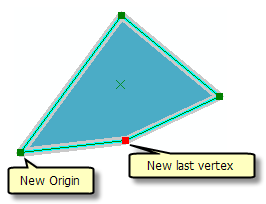
- In the selected polygon, click on another vertex to set it as the new origin.
The selected feature's vertices are updated.
- If necessary, save edits.