ArcGIS Desktop

  • ArcGIS Pro
  • ArcMap

  • My Profile
  • Ayuda
  • Sign Out
ArcGIS Desktop

ArcGIS Online

La plataforma de representación cartográfica para tu organización

ArcGIS Desktop

Un completo SIG profesional

ArcGIS Enterprise

SIG en tu empresa

ArcGIS Developers

Herramientas para crear aplicaciones basadas en la ubicación

ArcGIS Solutions

Plantillas de aplicaciones y mapas gratuitas para tu sector

ArcGIS Marketplace

Obtén aplicaciones y datos para tu organización.

  • Documentación
  • Soporte
Esri
  • Iniciar sesión
user
  • Mi perfil
  • Cerrar sesión

ArcMap

  • Inicio
  • Introducción
  • Cartografiar
  • Analizar
  • Administrar datos
  • Herramientas
  • Extensiones

Workflow configuration for the Check Out custom step

Disponible con licencia de Production Mapping.

The Check Out step checks out the product associated with the job. A series of parameters is available to define how the checkout location is specified.
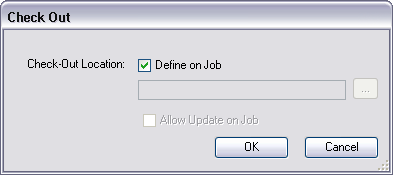
Check Out dialog box

The table below outlines each step type argument and associated behavior:

NameDescriptionArgument exampleBehavior

Check Out Location (Optional)

Specifies the checkout location.

Two options are available:

  • Define on Job (Default)
  • Path to Check Out Location (folder)

Define on Job is the default; no argument specified.

On step execution, you are prompted to browse to a checkout location.

/CheckOutLocation:C:\Data

The checkout location preset on the step type is displayed.

The Update Check Out Location argument determines whether you can update this default checkout location.

Update Check Out Location (Optional—Only available when default checkout location is set)

Determines whether the default checkout location may be updated on step execution.

Two options are available:

  • Allow Update (Default)
  • Do Not Allow Update

Allow Update is the default; no argument specified.

On step execution, you are presented with the checkout location preset on the step type. You can choose to update this location.

/UpdateCheckOutLocation:False

On step execution, you are presented with the checkout location preset on the step type but cannot update this property.

Arguments for the Check Out step
Nota:

The Identify Product and Check Out steps are maintained independently to allow workflows to be defined where a manager might assign a product to technical staff. Product library permissions are therefore only validated on execution of the Check Out step.

ArcGIS Desktop

  • Inicio
  • Documentación
  • Soporte

ArcGIS

  • ArcGIS Online
  • ArcGIS Desktop
  • ArcGIS Enterprise
  • ArcGIS
  • ArcGIS Developer
  • ArcGIS Solutions
  • ArcGIS Marketplace

Acerca de Esri

  • Quiénes somos
  • Empleo
  • Blog de Esri
  • Conferencia de usuarios
  • Cumbre de desarrolladores
Esri
Díganos su opinión.
Copyright © 2021 Esri. | Privacidad | Legal