Disponible con licencia de Business Analyst.
Resumen
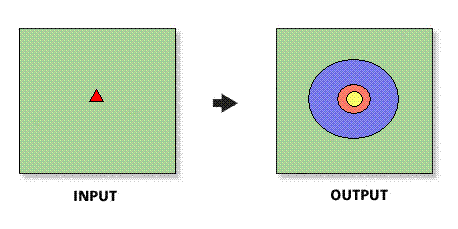
Creates rings around stores. The radii of the rings are determined by expanding from the store location until they meet the criteria included in the store layer.
Ilustración
Uso
The spatial reference of the output feature class will be the same as the store layer.
The store layer input feature class must be point features.
In most cases, the store layer input feature layer will be a Business Analyst store layer.
Selecting all sites to use will create rings for each point feature in the ring centers (stores) input feature class.
In ArcMap, trade areas will only be created for features that are within the active study area or analysis extent.
Threshold values can only be created based on numeric data.
The threshold layer must be a point or polygon feature class and be set up as a Business Analyst Dataset (BDS) layer. In most cases, you should select the block group or block points layer.
Sintaxis
arcpy.ba.ThresholdDataDrivenRing(InputFeatureLayer, IDField, All_Or_Single_Or_Selected, ThresholdFeatureLayer, ThresholdPopulationField, RadiusFieldName, OutputFeatureClass, {ByID_Or_ByName}, {Single_Site}, {Donut})| Parámetro | Explicación | Tipo de datos |
InputFeatureLayer | The input feature class containing center points for the drive-time trade areas. In most cases, this will be a Business Analyst store layer. | Feature Layer |
IDField | Unique ID field in the ring center (store) layer. | Field |
All_Or_Single_Or_Selected | Option defining how to create rings for points in the input feature layer:
| String |
ThresholdFeatureLayer | The input feature class containing the threshold data that will determine the radii. | Feature Layer |
ThresholdPopulationField | The threshold value field contained in the threshold layer. | Field |
RadiusFieldName | The field containing the thresholds for each store point. | Field |
OutputFeatureClass | The feature class that will contain the ring features. | Feature Class |
ByID_Or_ByName (Opcional) | Field used to select a single point.
| String |
Single_Site (Opcional) | ID or name of store to be used as the single point. | String |
Donut (Opcional) | Defines whether to create nonoverlapping concentric rings, or donut bands.
| Boolean |
Muestra de código
ThresholdDataDrivenRing example (stand-alone script)
# Name: ThresholdDataDrivenRing.py
# Description: Creates thresholds rings around stores.
# Author: Esri

# Import system modules
import arcview
import arcpy

arcpy.ImportToolbox(r"C:\Program Files (x86)\ArcGIS\Desktop10.8\Business Analyst\ArcToolbox\Toolboxes\Business Analyst Tools.tbx")

# Acquire extension license
arcpy.CheckOutExtension("Business")

# Define input and output parameters for the Data Driven Rings tool
InputFeatureLayer = "C:/temp/sf_store.shp"
IDField = "STORE_ID"
All_Or_Single_Or_Selected = "ALL"
ThresholdFeatureLayer = "C:/ArcGIS/Business Analyst/US_2022/Data/Demographic Data/BlockGroups_bg.bds"
ThresholdPopulationField = "TOTPOP_CY"
RadiusFieldName = "SALES"
OutputFeatureClass = "C:/temp/RingOutput.shp"
ByID_Or_ByName=""
Single_Site=""
Donut = "False"


# Create data driven rings trade areas
arcpy.ThresholdDataDrivenRings_ba(InputFeatureLayer,
						IDField,
						All_Or_Single_Or_Selected,
						ThresholdFeatureLayer,
						ThresholdPopulationField,
						RadiusFieldName,
						OutputFeatureClass,
						ByID_Or_ByName,
						Single_Site,
						RemoveOverlap,
						Donut)

# Release extension license
arcpy.CheckInExtension("Business")
Entornos
Esta herramienta no utiliza ningún entorno de geoprocesamiento.
Información de licenciamiento
- Basic: Requiere Business Analyst
- Standard: Requiere Business Analyst
- Advanced: Requiere Business Analyst